




To build a delivery management system, start by mapping your delivery workflow. Then build four core parts: a dispatch dashboard, a driver app, customer tracking, and an admin and reporting panel. Pick a routing engine, connect the system to your order and warehouse tools, and launch an MVP with a small group of drivers before rolling it out to your whole fleet. A custom delivery management system usually costs $10,000 to $150,000+. An MVP takes about 3 to 4 months.
This guide is for courier companies, retailers, restaurants, distributors and logistics firms that have outgrown spreadsheets and phone calls. It covers what to build, how to build it, what it costs, and when an off-the-shelf tool is the smarter choice.
What Is a Delivery Management System?
A delivery management system (DMS) is software that runs every step of a delivery, from the moment an order comes in to the moment it reaches the customer. It assigns orders to drivers, plans their routes, tracks them live, collects proof of delivery and keeps customers updated.
It connects four groups of people:
- Dispatchers who assign and monitor deliveries
- Drivers who complete them
- Customers who track them
- Managers who review performance and costs
How Is a Delivery Management System Different From a TMS or WMS?
These three systems are often confused, but each handles a different part of the supply chain.
| System | What It Manages | Typical User |
| Delivery management system (DMS) | Last-mile deliveries: dispatch, routes, drivers, tracking, proof of delivery | Couriers, retailers, restaurants, local distributors |
| Transportation management system (TMS) | Long-distance freight: carriers, loads, freight rates, shipments between cities | Manufacturers, freight forwarders, 3PLs |
| Warehouse management system (WMS) | Stock inside the warehouse: receiving, storage, picking, packing | Warehouses and fulfilment centres |
Many businesses need a DMS that connects to their WMS, so drivers are dispatched only when an order is packed and ready.
Should You Build or Buy Delivery Management Software?
Off-the-shelf delivery tools like Onfleet, Routific, Tookan and eLogii charge a monthly fee, usually based on drivers, tasks or routes. They’re the fastest way to start. Custom software costs more up front but has no per-order fees and fits your exact workflow.
| Your Situation | Better Choice |
| Fewer than about 1,000 deliveries a month | Buy a SaaS tool |
| Standard workflow with no unusual rules | Buy a SaaS tool |
| Growing past several thousand deliveries a month | Compare 3-year SaaS fees with a custom build |
| Unique rules (cold chain, COD reconciliation, hub transfers, B2B invoicing) | Build custom |
| Deep links to your ERP, WMS or POS | Build custom |
| You want to sell delivery software to other businesses | Build custom |
A simple way to decide: Multiply your expected monthly SaaS bill by 36. If that 3-year total is close to or higher than the cost of a custom build, custom software usually pays for itself, because you also own the code and can change it whenever you need to.
Types of Delivery Management Systems by Industry
| Type | Who Uses It | Special Features |
| Courier and parcel | Courier companies, 3PLs | AWB numbers, labels, barcode scans, hub transfers, returns |
| Food and restaurant | Restaurants, cloud kitchens | Prep-time sync, short delivery windows, rider pooling |
| Grocery and quick commerce | Supermarkets, dark stores | Slot booking, substitutions, order batching |
| Pharmacy | Pharmacies, medicine distributors | Prescription checks, cold-chain logs, ID verification |
| Ecommerce last mile | Online stores, D2C brands | Store integrations, branded tracking, failed-delivery handling |
| B2B distribution | Wholesalers, FMCG distributors | Bulk and recurring orders, invoices, credit limits |
| Fleet delivery | Companies with their own vehicles | Vehicle tracking, fuel logs, maintenance alerts |
| Multi-vendor | Marketplaces and aggregators | Many pickup points, vendor payouts, central dispatch |
Courier businesses need the most specialised setup, which is why courier management software usually adds hub scanning and airway bill handling on top of standard dispatch. Restaurants need food delivery systems that sync rider arrival with kitchen prep time. Grocers need grocery delivery software with slots and substitutions. Medicine delivery platforms must check prescriptions before dispatch, and they often connect to pharmacy management software for stock.
Ready to Develop Your Delivery Management Software?
From real-time tracking and route optimization to driver management and customer notifications, we’ll help you build a delivery solution tailored to your business needs.
Talk to Our Delivery Software Experts
Must-Have Features of a Delivery Management System
A complete delivery management system has eight modules. An MVP needs the first six.
1. Order Management
- Order intake from your website, app, POS, ERP or CSV upload
- Bulk import for high-volume days
- Delivery time windows and priority flags
- Order edits, cancellations and reschedules
2. Dispatch Dashboard
- Live map of all drivers and open orders
- Manual drag-and-drop assignment
- Auto-assignment by distance, zone, driver load and vehicle type
- Alerts for late, stuck or failed deliveries
3. Route Planning and Optimization
- Best stop order for each driver, based on traffic, time windows and vehicle capacity
- Multi-stop routes for a full day of deliveries
- Re-routing when an order is added or cancelled mid-route
4. Driver App
- List of today’s stops in order, with built-in navigation
- One-tap status updates: arrived, picked up, delivered, failed
- Offline mode that syncs when the signal returns
- Masked calling so drivers and customers don’t see each other’s numbers
- Cash collection logging for cash-on-delivery orders
5. Proof of Delivery
- Photo, digital signature or customer OTP
- GPS location and time stamp on every delivery record
- Reason codes for failed attempts, such as “customer not home” or “wrong address”
6. Customer Tracking and Notifications
- A tracking link with live driver location and ETA
- SMS, email, push and WhatsApp updates at every status change
- Delivery instructions, like “leave with security”
- Post-delivery rating
7. Admin Panel and Access Control
- Role-based access for admins, zone managers, dispatchers and drivers
- Zone, pricing and working-hour settings
- Driver onboarding and document checks
8. Reports and Analytics
- On-time delivery rate by driver, zone and day
- Failed delivery rate and reasons
- Cost per delivery and distance per driver
- Driver idle time and deliveries per shift
Courier Management System Features for Parcel Businesses
Courier companies handle more steps than a single-store delivery business, so their software needs these on top of the core modules:
- AWB and label generation: Create airway bill numbers and printable shipping labels with barcodes.
- Barcode and QR scanning: Scan every parcel at pickup, hub arrival, hub dispatch and delivery, so its location is always known.
- Hub and branch transfers: Track parcels moving between the pickup hub, sorting centre and delivery branch.
- First-, middle- and last-mile tracking: Show one status history across all legs of the journey.
- Pickup scheduling: Let businesses book pickups by time slot, with automatic driver assignment.
- Returns (RTO) handling: Manage failed deliveries sent back to the seller, with reasons and charges.
- COD reconciliation: Match cash collected by each driver against their deliveries, and track remittance to sellers.
- Rate cards: Calculate charges by weight, size, zone and delivery speed.
Advanced Delivery Management Software Features to Add Later
- AI route optimization: Learns from past routes to plan faster ones.
- Machine-learning ETAs: Predicts arrival times from real delivery history as well as distance.
- Demand forecasting: Predicts order volume by zone so you can plan driver shifts.
- Multi-carrier management: Sends each order to your own fleet or a third-party carrier based on cost, weight and destination.
- Geofencing: Updates statuses automatically when a driver enters or leaves a location.
- Temperature logging: Records cold-chain data for food and medicine.
- Branded tracking pages: Tracking in your own colours and logo.
Most of these need several months of delivery data before they’re accurate. That’s why teams usually roll out AI features for delivery platforms in phases, starting with maps-based routing.
Delivery Management System Architecture and Tech Stack
How to Choose the Right Software Architecture
Start with a Modular Monolith
One codebase with clearly separated modules (orders, dispatch, tracking, billing) is faster and cheaper to build. It also works well for most businesses up to thousands of orders a day.
Split into Microservices Later
Once one part, usually tracking or dispatch, needs to scale on its own, move it into a separate service.
Use WebSockets for Live Updates
Many cheap systems check for new statuses every 10 to 30 seconds. WebSockets push each change the moment it happens, so dispatchers and customers see real positions.
Plan for Heavy Location Data
Driver GPS pings every few seconds add up fast. Store live positions in a fast cache like Redis and keep only the history you need.
Best Tech Stack for Delivery Management Software
| Layer | Recommended Options |
| Web dashboard and admin | React.js, Next.js, Vue.js |
| Driver and customer apps | Flutter, React Native, Swift, Kotlin |
| Backend | Node.js, Python (Django, FastAPI), Laravel |
| Database | PostgreSQL, MongoDB |
| Live data and caching | Redis, WebSockets, Socket.io |
| Maps and routing | Google Maps Platform, HERE, Mapbox, OSRM, Google OR-Tools |
| Notifications | Twilio, WhatsApp Business API, Firebase Cloud Messaging, SendGrid |
| Cloud | AWS, Google Cloud, Azure |
| Payments | Stripe, Razorpay, PayPal |
For the driver app, Flutter or React Native let one codebase run on Android and iOS. That keeps costs down, since most delivery fleets use low-cost Android phones.
How to Build Delivery Management Software: Step-by-Step Process
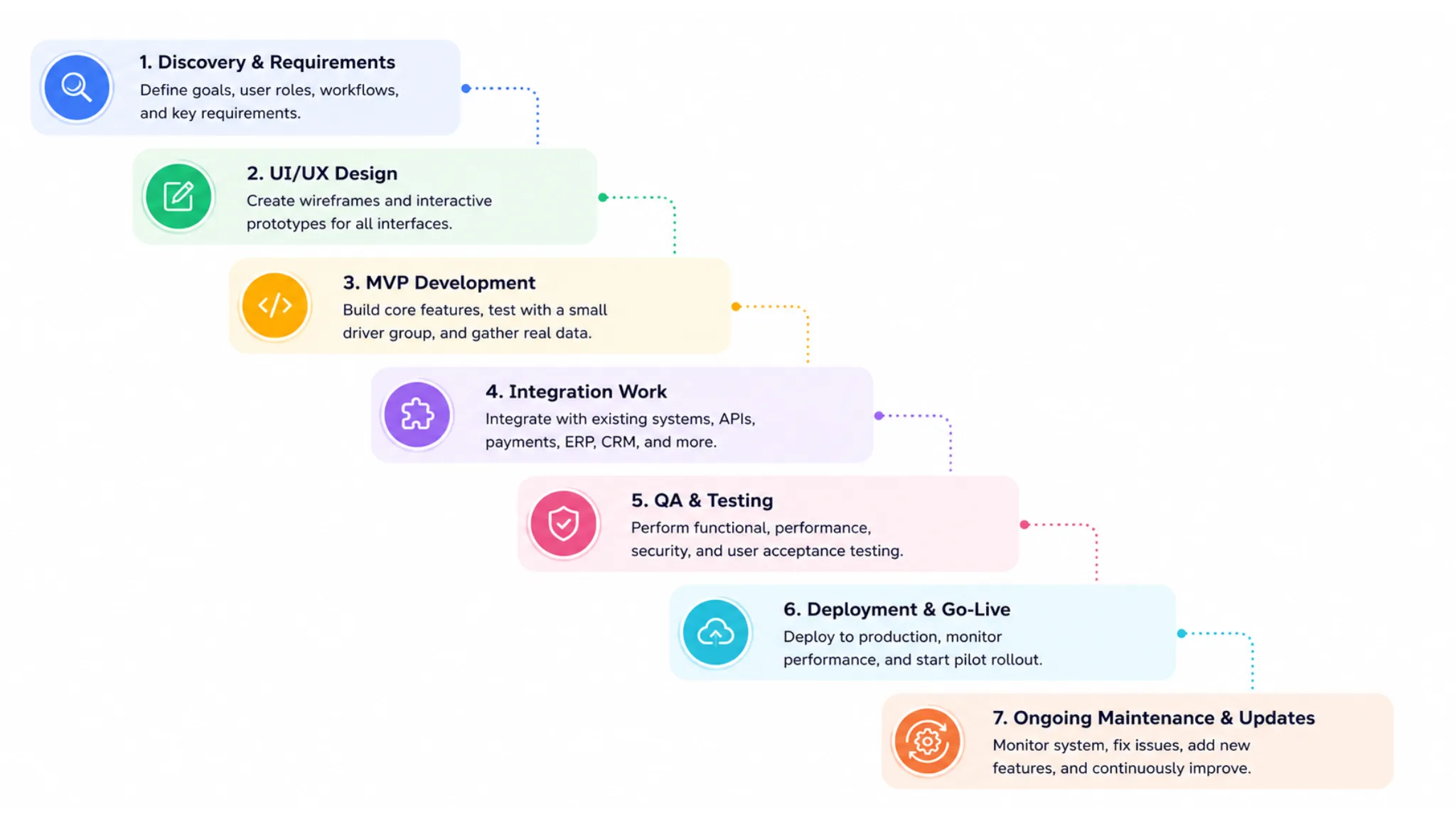
| Step | What Happens | Time |
| 1. Discovery | Map workflows for every role, list integrations, set MVP scope | 2 to 3 weeks |
| 2. UI/UX design | Wireframes and prototypes for the dashboard, driver app and tracking page | 3 to 4 weeks |
| 3. MVP development | Orders, dispatch, driver app, proof of delivery, tracking, notifications | 8 to 10 weeks |
| 4. Integrations | ERP, WMS, store platforms, carriers, payments | 2 to 4 weeks (overlaps with development) |
| 5. Testing | Real delivery tests, bulk imports, weak-signal areas, failed deliveries | 2 to 3 weeks |
| 6. Pilot launch | Run with a small group of drivers in one zone | 2 to 4 weeks |
| 7. Full rollout and support | Add the full fleet, monitor and improve | Ongoing |
Step 1: Map Your Delivery Workflow
Write down how a delivery moves through your business today, step by step, for every role. List the systems it must connect to. Then split features into “must have for launch” and “later.” This step prevents the most expensive mistake in software projects: building the wrong thing.
Step 2: Design the Dashboard and Driver App
Put the most design effort into the dispatch dashboard and the driver app. A dispatcher should manage 50+ live deliveries from one screen. A driver should complete a delivery in a few taps with one hand.
Step 3: Build the Delivery Management MVP
Build the core loop first: order in, driver assigned, route shown, delivery completed, customer notified. Leave AI and multi-carrier features for later phases.
Step 4: Connect Your Existing Business Systems
Integrations often take longer than planned. Budget time for reading API documentation, testing in sandbox accounts and handling unusual cases, such as an order changed in the ERP after dispatch.
Step 5: Test the System on Real Delivery Routes
Test with real drivers on real roads. Check bulk imports, route changes mid-shift, failed attempts, photo uploads on slow networks, and what happens when the driver app loses signal.
Step 6: Run a Pilot With a Small Driver Group
Run the system with 5 to 10 drivers in one zone for a few weeks. Fix problems before they affect your whole fleet.
Step 7: Roll Out to Your Full Fleet and Maintain It
Move the rest of your drivers over in stages. Plan updates every two to three months for OS changes, map API updates and security patches.
Team Needed for Delivery Management Software Development
| Role | MVP | Enterprise Build |
| Project manager | 1 | 1 |
| Business analyst | Part-time | 1 |
| UI/UX designer | 1 | 1 to 2 |
| Mobile developers | 1 to 2 | 2 to 4 |
| Backend developers | 1 to 2 | 2 to 4 |
| Web (dashboard) developer | 1 | 1 to 2 |
| QA engineer | 1 | 1 to 2 |
| DevOps engineer | Part-time | 1 |
Many businesses outsource the full team, or hire dedicated mobile developers to work alongside their in-house product lead.
How Much Does It Cost to Build Delivery Management Software?
A custom delivery management system costs $10,000 to $150,000+ with an India-based team. The price depends on the number of modules, integrations and user roles, and on whether you need AI features.
| Build Level | What’s Included | Cost | Time |
| MVP | Order management, dispatch, driver app, proof of delivery, tracking, notifications | $10,000 to $25,000 | 3 to 4 months |
| Mid-level | Adds auto-dispatch, route optimization, analytics, 2 to 3 integrations | $25,000 to $50,000 | 4 to 6 months |
| Enterprise | Adds AI routing, multi-carrier, courier hub features, ERP and WMS links, multi-city | $50,000 to $150,000+ | 6 to 12 months |
Delivery Management System Cost by Module
| Module | Typical Cost |
| Order management | $2,000 to $6,000 |
| Dispatch dashboard | $3,000 to $10,000 |
| Driver app (Android and iOS) | $4,000 to $12,000 |
| Customer tracking and notifications | $2,000 to $6,000 |
| Route optimization (via API) | $3,000 to $10,000 |
| Admin panel and reports | $3,000 to $10,000 |
| Courier features (AWB, scanning, hubs, COD) | $6,000 to $20,000 |
| Each major integration (ERP, WMS, carrier) | $2,000 to $8,000 |
How to Estimate Your Development Cost
For example, an MVP that needs 600 to 1,000 hours of work, built by an Indian team at $25 an hour, costs about $15,000 to $25,000. The same hours at a US rate of $120 an hour would cost $72,000 to $120,000.
| Region | Typical Hourly Rate |
| India | $20 to $50 |
| Eastern Europe | $40 to $99 |
| Western Europe | $80 to $180 |
| USA and Canada | $100 to $250 |
Monthly Running Costs After Launch
- Maps and routing APIs: Billed by usage, and it grows with your delivery volume.
- SMS and WhatsApp messages: Billed per message.
- Cloud hosting: Usually $100 to $1,000+ a month, depending on order volume.
- Maintenance: Budget 15% to 20% of the build cost each year for updates, fixes and small features.
What Increases the Cost of Delivery Software?
- More user roles, such as separate hub, branch and zone managers
- Complex integrations with older ERP systems
- Offline-first driver apps for rural routes
- Custom AI models instead of ready APIs
- Multi-country support with several languages, currencies and tax rules
Key Integrations for a Delivery Management System
- ERP and order systems: Orders from SAP, Oracle, Tally or your own system should flow in automatically, with no retyping.
- Warehouse management system: Dispatch should start only when the WMS confirms an order is packed.
- Store platforms: Shopify, WooCommerce and Magento orders should appear as deliveries without manual entry.
- Third-party carriers: Show carrier shipments, like DHL or regional couriers, next to your own fleet on one dashboard.
- Payments and accounting: Sync COD collections and online payments with your accounting software.
- CRM: Send delivery history and ratings to your CRM so support teams have full context.
Common Mistakes When Building Delivery Management Software
- Building every feature before testing the core delivery loop with real drivers
- Designing the driver app for new phones when your fleet uses budget Android devices
- Skipping offline mode, then losing delivery records in weak-signal areas
- Adding role-based access late, which is expensive and creates security gaps
- Ignoring COD reconciliation until cash starts going missing
- Underestimating integration time
How Comfygen Builds Custom Delivery Management Systems
Comfygen has built custom logistics software and delivery platforms for businesses in the US, UK, UAE, Europe and Australia. The work covers courier delivery, grocery, food, quick commerce and multi-carrier logistics. One example is DiarchGo, a grocery delivery app built by the Comfygen team. The team has also built white-label logistics apps for retail aggregators managing last-mile delivery across several cities.
Since 2019, Comfygen has delivered 550+ projects for 400+ clients in 30+ countries, and 97% of clients come back for their next project. Each delivery management project starts with a scoped discovery phase that maps your delivery model, current systems and growth plans before any build decisions are made.
Frequently Asked Questions
What is a delivery management system?
How much does it cost to build delivery management software?
How long does it take to build a delivery management system?
Should I build or buy delivery management software?
What features does a courier management system need?
Can delivery management software integrate with my ERP?
How much does it cost to maintain delivery management software?

Mr. Saddam Husen, (CTO)
Mr. Saddam Husen, CTO at Comfygen, is a renowned Blockchain expert and IT consultant with extensive experience in blockchain development, crypto wallets, DeFi, ICOs, and smart contracts. Passionate about digital transformation, he helps businesses harness blockchain technology’s potential, driving innovation and enhancing IT infrastructure for global success.