




To develop pharmacy management software, plan around four core modules: inventory, prescriptions, billing, and compliance. Choose a cloud-based architecture, build on a HIPAA- and DSCSA-ready stack, and test against real pharmacist workflows before launch. A basic single-store system costs $25,000 to $60,000 and takes three to four months. An enterprise, multi-store platform with AI features can run $150,000 to $400,000 or more and take seven to nine months.
Manual pharmacy operations are quietly expensive. A misread prescription, an expired batch left on the shelf, or a stockout of a fast-moving drug does not just cost money, it erodes patient trust and invites compliance risk. This is why pharmacy owners, hospital chains, and healthtech startups increasingly choose to develop pharmacy management software built around their own workflows instead of forcing operations into rigid, off-the-shelf tools.
At Comfygen, we build custom healthcare and pharmacy solutions for startups and enterprises across more than 30 countries. This guide covers what a pharmacy management system actually does, the modules and types available, the features that matter, the right technology stack, the compliance you cannot skip, and realistic costs and timelines.
Key Takeaways
- Plan around four pillars: inventory, prescriptions, billing, and compliance.
- Pharmacy software comes in different types, retail, hospital, online, chain, long-term care, and compounding, each with a different build priority.
- HIPAA, GDPR, and DSCSA compliance are non-negotiable for any pharmacy software handling patient or drug data.
- Cloud-based, modular architecture makes it easier to scale, integrate, and maintain the software over time.
- Most projects take a few months for an MVP and longer for a full, multi-store enterprise platform.
Pharmacy Management Software Market: Key Statistics
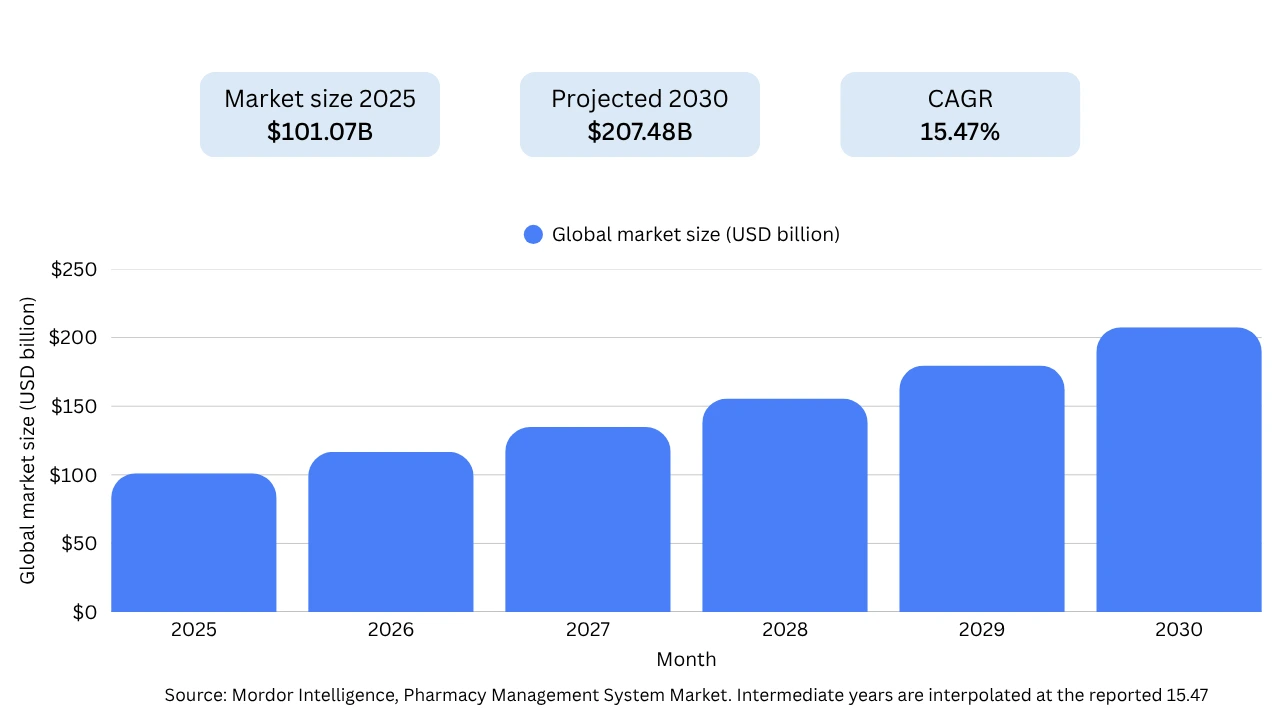
The global pharmacy management system market is estimated at USD 101.07 billion in 2025 and projected to reach USD 207.48 billion by 2030, growing at a 15.47% CAGR. A separate forecast from Research and Markets values the pharmacy management software market at USD 105.94 billion in 2025, expanding to USD 189.97 billion by 2030 at a 12.40% CAGR, confirming strong double-digit growth across analysts.
- Patient safety is the core driver: The World Health Organization estimates the global cost of medication errors at USD 42 billion annually, nearly 1% of total global health expenditure. Software that automates dispensing and flags drug interactions addresses this directly.
- Cloud has become the default: Roughly 83% of pharmaceutical organizations already run core workloads in the cloud, and cloud platforms held a 63.40% share of deployments in 2024, the fastest-growing segment.
- Independents are digitizing too: Subscription pricing now lets single-site pharmacies access enterprise-grade analytics without large upfront costs, widening the customer base for new software.
For businesses planning to develop pharmacy management software, the trend points to one conclusion: a cloud-based, compliance-ready, analytics-driven platform is the baseline the market now expects, not a bonus feature.
What Is a Pharmacy Management System?
A pharmacy management system is the combination of software, hardware, and workflows a pharmacy uses to dispense medication, track inventory, manage patient records, process payments, and stay compliant with healthcare regulations. Pharmacy management software is the digital core of that system, the application pharmacists log into every day.
The distinction matters. Software refers to the application layer (modules, database, interface), while a system includes the surrounding setup such as barcode scanners, label printers, and the operational process a pharmacy follows. When a business sets out to build pharmacy management software, it is usually building that digital core and then connecting it to existing hardware and third-party services.
Pharmacy Software Modules and Types
Before choosing features, it helps to know how the software is organized at a system level, and which type fits your business model.
The three functional layers behind most pharmacy platforms:
- Operations layer (ERP-style): handles inventory, procurement, batch and expiry tracking, and supplier records. For pharmacies already running an ERP, the practical move is usually to integrate or extend it rather than build a new one from scratch.
- Relationship layer (CRM-style): tracks patient history, refill patterns, and communication preferences, so the pharmacy can send timely refill reminders and personalize service instead of treating every visit as a first visit.
- Storefront and billing layer: covers point-of-sale, discounts, taxes, and checkout, whether that checkout happens at a physical counter or through a patient-facing app.
Types of pharmacy management software, by business model:
- Retail pharmacy software for independent drugstores and small chains that need inventory, POS, and prescription processing in one place.
- Hospital pharmacy software integrated with clinical and EHR systems, built around inpatient and outpatient order flows.
- Online and e-pharmacy platforms with a patient-facing app or storefront, e-prescriptions, and delivery logistics.
- Chain and franchise systems that need centralized, multi-store control over pricing, inventory, and reporting.
- Long-term care pharmacy software for nursing homes and assisted-living facilities, built around resident medication schedules rather than walk-in dispensing.
- Compounding pharmacy software for pharmacies and labs that prepare customized medications, with ingredient tracking and formulation records built in.
Most businesses start with retail, hospital, or online as the primary model, then add chain-level or compounding features later as they scale. Picking the wrong type at scoping stage is one of the more expensive mistakes in pharmacy software development, since it changes the data model, not just the interface.
Core Features of Pharmacy Management Software
The feature set defines the value of your pharmacy management software. Below are the modules we consider essential, followed by the advanced capabilities that differentiate a modern platform.
|
Feature |
What It Does |
Why It Matters |
|---|---|---|
| Inventory & stock control | Tracks quantities, expiry dates, and batch numbers in real time | Prevents stockouts, reduces wastage from expired drugs |
| Prescription & patient records | Stores e-prescriptions, medication history, and patient data securely | Enables faster, safer dispensing and continuity of care |
| Drug interaction alerts | Flags risky drug combinations and patient allergies | Reduces medication errors and legal exposure |
| Billing & invoicing | Automates pricing, discounts, taxes, and insurance claims | Speeds up checkout and minimizes billing errors |
| Reporting & analytics | Surfaces sales, stock turnover, and demand trends | Supports data-driven purchasing and business decisions |
| Multi-store support | Centralizes inventory and pricing across locations | Essential for chains and franchises |
| Role-based access control | Restricts data and actions by user role | Protects sensitive data and supports compliance |
Must-Have Features
Inventory management is the backbone of any pharmacy operation. Real-time tracking of stock levels, expiry dates, and batch numbers prevents both stockouts and the silent losses that come from expired medication sitting on shelves. Pair this with prescription and patient record management, where strong encryption and quick retrieval let pharmacists work safely and fast.
Drug interaction alerts protect patients directly. When a pharmacist enters a new medication, the system should automatically check it against the patient’s existing prescriptions and known allergies. Billing and invoicing, meanwhile, should automate tax, discounts, and insurance claim handling so checkout is quick and error-free the same principles we apply in our billing software development work.
Advanced Features That Set Your Software Apart
To build pharmacy management software that competes in 2026, consider these additions on top of the must-haves:
- AI-driven demand forecasting that predicts which drugs will sell and when, so purchasing decisions are based on data instead of guesswork.
- Automated reordering that triggers purchase orders before stock runs low.
- Patient-facing mobile app for refills, dosage reminders, and order tracking.
- Telepharmacy support for remote consultations, useful for chains covering areas with limited pharmacist availability.
- Barcode or RFID scanning for faster, more accurate stock handling and point-of-sale verification.
- Pill imaging that matches a scanned pill against a visual reference database, catching dispensing errors before they reach the patient.
- Automated data backup so pharmacy records are never at risk from a single point of failure.
- Alerts and notifications for expiring stock, pending refills, and compliance deadlines, sent to staff before they become a problem.
Turn Your Pharmacy Operations Digital
Book a free strategy call to explore automation, inventory tracking, e-prescriptions, billing, and patient management solutions.
Book a Strategy Call
How to Develop Pharmacy Management Software: Step-by-Step
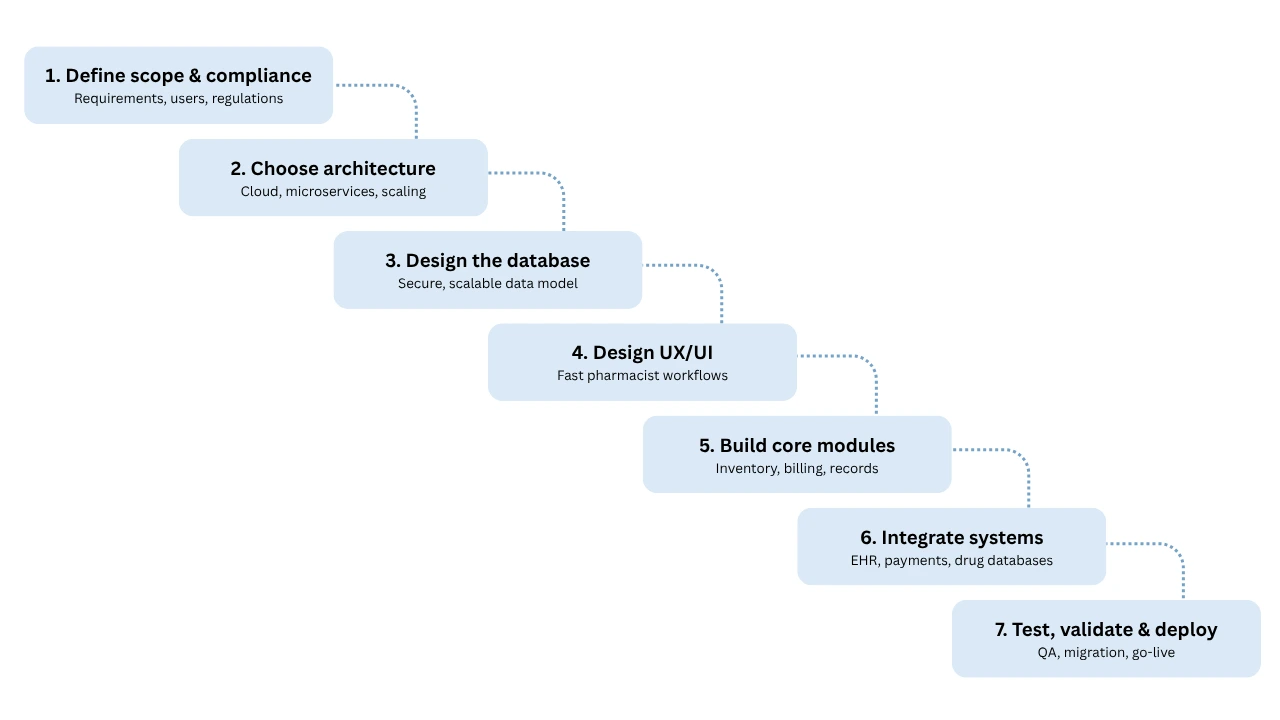
Here is the process we follow when we develop prescription management software for clients. Treat these seven steps as a sequence, not a checklist, each one feeds the next.
Step 1: Define Scope, Requirements, and Compliance Needs
Start by defining exactly what the software must do, who will use it, and which regulations apply. Document the modules you need, the user roles, the integrations, and the compliance requirements for every region you operate in. A clear scope here prevents the budget overruns and scope creep that derail most projects.
Step 2: Choose the Right Architecture
Architecture decisions made early have long-term consequences. The two key choices in pharmacy software development are deployment model and structure:
- Cloud vs. on-premise: Cloud-based deployment offers real-time syncing, automatic backups, multi-location access, and easier scaling. On-premise gives more direct control but higher maintenance overhead. Most modern pharmacies choose cloud.
- Monolithic vs. microservices: A monolith is simpler and faster to launch for a focused product. Microservices add flexibility and independent scaling, which suits large chains and platforms expecting heavy growth.
Step 3: Design the Database and Data Model
A pharmacy handles sensitive, high-volume data: patient records, prescriptions, inventory, batches, and transactions. The database must be scalable, secure, and structured to keep this data consistent and quickly retrievable. This foundation determines how well everything above it performs.
Step 4: Design UX/UI for Pharmacist Workflows
Pharmacists work under time pressure, so the interface must reduce clicks, not add them. Good UX here means fast prescription entry, clear alerts, and a layout new staff can learn quickly. Design around the actual workflow of dispensing, not around a generic dashboard.
Step 5: Build the Core Modules
With the foundation set, development begins. This is the stage where you build pharmacy management software module by module, inventory, prescriptions, billing, reporting, following the chosen tech stack and architecture. Regular code reviews and interim testing keep quality high and catch issues before they compound.
Step 6: Integrate Third-Party Systems
A pharmacy platform rarely operates alone. Plan integrations with EHR/EMR systems (via HL7 or FHIR standards), payment gateways, insurance and claims processors, and drug databases for interaction checking. Clean integration is often where projects succeed or stall, so budget real time for it.
Step 7: Test, Validate, and Deploy
Before launch, the software goes through functional, performance, and security testing. For a healthcare product, validation against compliance requirements is part of QA, not an afterthought. Once testing passes, deployment includes data migration from legacy systems, staff training, and a monitored go-live to protect daily operations.
Planning a Pharmacy App or Management Platform?
Request a custom quote and get expert guidance on architecture, integrations, UI/UX, and healthcare compliance.
Discuss Your Project Today
Technology Stack for Pharmacy Software Development
The right tools matter. Below is a representative stack we use for prescription management software development, adjusted per project based on scale and compliance needs.
|
Layer |
Technologies |
Purpose |
|---|---|---|
| Frontend | React, Next.js, Flutter | Responsive web and cross-platform mobile interfaces |
| Backend | Laravel (PHP), Node.js | Business logic, APIs, and processing |
| Mobile | Flutter, Swift, Kotlin | Native and cross-platform patient/staff apps |
| Database | MySQL, MongoDB | Structured and flexible data storage |
| Cloud | AWS, Google Cloud, Azure | Hosting, scaling, backups |
| Integrations | HL7/FHIR, payment gateway APIs, drug databases | Interoperability with healthcare and finance systems |
The principle behind the stack is simple: choose proven technologies that your team can maintain long-term, and prioritize interoperability so the software can talk to the wider healthcare ecosystem.
Regulatory Compliance and Security
For a healthcare product, trust is built on compliance. Any pharmacy software that handles patient or drug data must meet strict regulatory standards, and getting this wrong carries legal and reputational consequences. This is the area where cutting corners costs the most.
|
Regulation / Standard |
Region |
What It Governs |
|---|---|---|
| HIPAA | United States | Protection and privacy of patient health data |
| GDPR | European Union | Personal data protection and consent |
| DSCSA | United States | Drug supply chain traceability and serialization |
| HL7 / FHIR | Global | Healthcare data exchange and interoperability |
Beyond regulations, build in strong security from the start: end-to-end encryption for sensitive data, detailed audit logs, role-based access control, and secure authentication. These are not optional features, they are what earns and keeps the trust of patients and regulators alike.
Need HIPAA-Compliant Pharmacy Software Development?
Connect with our team to design scalable, secure, and fully compliant pharmacy management software tailored to your business.
Get a Quote
Cost to Develop Pharmacy Management Software
Cost is the most common question in any pharmacy management software project, and the honest answer is that it depends on scope. The table below gives realistic ranges by complexity tier.
|
Tier |
Scope |
Typical Cost Range |
|---|---|---|
| Basic | Core inventory, billing, single store | $25,000 – $60,000 |
| Mid-range | Multi-store, analytics, patient records, integrations | $60,000 – $150,000 |
| Enterprise | AI features, telepharmacy, full compliance, custom integrations | $150,000 – $400,000+ |
The main factors that move cost are the feature set, the number and complexity of integrations, the depth of compliance required, the platforms you support (web, iOS, Android), and the location and experience of your development team.
Budget for ongoing costs too. Maintenance, security updates, compliance updates, hosting, and support typically run 15 to 20% of the initial build cost per year.
Development Timeline
Timelines for building pharmacy management software scale with complexity. The phases below are sequential, though some overlap in practice.
|
Phase |
Duration (Approx.) |
|---|---|
| Discovery & planning | 2 – 4 weeks |
| UX/UI design | 3 – 6 weeks |
| Core development | 10 – 20 weeks |
| Integration | 3 – 6 weeks |
| Testing & QA | 3 – 5 weeks |
| Deployment & training | 2 – 4 weeks |
A focused MVP can launch in a few months, while a full enterprise platform with multi-store support and advanced features typically takes longer. Building the MVP first lets you validate with real users before investing in the full feature set.
Common Challenges and How to Solve Them
Integration issues: Connecting to existing EHR, payment, and insurance systems can be complex.
Solution: build with strong integration capabilities and standard protocols like FHIR, and test integrations early rather than at the end.
Data migration: Moving records from legacy systems risks errors and loss.
Solution: create a detailed migration plan with data cleaning, validation, and a staged rollout.
Staff adoption: New software can meet resistance from busy staff.
Solution: involve staff during requirements gathering, design around their real workflow, and provide thorough training and support.
Compliance drift: Regulations change over time.
Solution: build modular compliance features and schedule regular reviews so the software stays current.
How AI Is Changing Pharmacy Software in 2026
Artificial intelligence is moving from a nice-to-have to a genuine differentiator. AI-driven demand forecasting helps pharmacies stock the right drugs at the right time, reducing both stockouts and waste. Automated prescription verification can flag anomalies before a human even reviews them, adding a safety layer. AI chatbots increasingly handle routine patient questions about refills, dosage timing, and store hours, freeing pharmacists for clinical work.
There is a newer shift worth planning for too: patients and staff are starting to ask AI assistants like ChatGPT, Claude, Gemini, and Perplexity general questions about medications and pharmacy services before they ever visit a website. Software and content built with clear, structured, factual information, not just a good interface, is what these AI tools pull from when answering those questions.
For any business planning to develop pharmacy management software that stays competitive, designing the architecture so AI modules can be added later is a smart decision. Our AI and machine learning development services help pharmacy platforms add these capabilities without rebuilding from scratch.
How Comfygen Can Help Your Pharmacy Business
Building pharmacy software is not just a coding project, it is a healthcare project with real patient-safety and compliance stakes. That is where an experienced development partner makes the difference between software that merely works and software that genuinely improves how a pharmacy runs.
Comfygen is a custom software development company with experience in healthcare and a track record of delivering complex, compliant platforms for clients across more than 30 countries. When you work with us on pharmacy management software development, you get a team that has already solved the hard problems, integrations, data security, and regulatory compliance, so you do not have to learn them the expensive way.
Here is what working with Comfygen looks like:
- Full-cycle pharmacy app development: We handle the full journey from requirements and architecture through design, development, integration, testing, and deployment, so you have a single accountable partner instead of a patchwork of vendors.
- Healthcare and compliance expertise: Our team builds with HIPAA, GDPR, and DSCSA requirements in mind from day one, and works with interoperability standards like HL7 and FHIR to connect your platform to the wider healthcare ecosystem.
- Custom-built, not templated: We design the software around your actual workflows, retail, hospital, online, or multi-store chain, instead of forcing your operations into a rigid product.
- Modern, maintainable technology: We build on proven stacks (React, Next.js, Flutter, Laravel, Node.js) and cloud architecture, so your platform scales as your business grows.
- AI-ready solutions: From demand forecasting to automated reordering, our AI and machine learning solutions help future-proof your platform.
- Transparent process and support: Clear timelines, milestone-based delivery, and ongoing maintenance keep your software secure, compliant, and current.
Whether you are a single pharmacy looking to modernize, a hospital integrating with clinical systems, or a startup building an e-pharmacy platform, Comfygen can turn your idea into a reliable, compliant, and scalable product. Get a free consultation to discuss discuss your project scope, timeline, and budget.
Conclusion
To develop pharmacy management software that genuinely improves operations, you need more than a feature list. You need the right architecture, a stack built for interoperability, security and compliance baked in from day one, and a development partner who understands healthcare workflows. Get those foundations right and the software pays for itself in fewer errors, less waste, and stronger patient trust.
If you are planning a pharmacy software project, Comfygen’s healthcare development team can help you scope it, build it, and ship it. Get in touch for a free consultation to map out your requirements, timeline, and budget.
Contact Now:-
Email: sales@comfygen.com
WhatsApp: +91-9587867258
Frequently Asked Questions
How much does pharmacy management software development cost?
How long does it take to build pharmacy management software?
What are the must-have features in a pharmacy management system?
What are the different types of pharmacy management software?
Should I build custom pharmacy software or buy an off-the-shelf product?
Is HIPAA compliance required for pharmacy software?
Can pharmacy management software integrate with hospital EHR systems?
What is the difference between pharmacy management software and a pharmacy management system?
Can AI improve pharmacy management software?
What technology stack is best for pharmacy software development?

Mr. Saddam Husen, (CTO)
Mr. Saddam Husen, CTO at Comfygen, is a renowned Blockchain expert and IT consultant with extensive experience in blockchain development, crypto wallets, DeFi, ICOs, and smart contracts. Passionate about digital transformation, he helps businesses harness blockchain technology’s potential, driving innovation and enhancing IT infrastructure for global success.