




Key takeaways
- A telemedicine MVP takes three to five months to build. A full platform with EHR integration and remote monitoring takes eight to fourteen months.
- Expect $30,000 to $75,000 for an MVP, $75,000 to $150,000 for a standard platform, and $150,000 upward for an advanced build.
- The five features you cannot ship without are video consultation, appointment booking, e-prescriptions, secure messaging, and medical records access.
- Compliance decides your architecture, so pick your markets in week one. HIPAA for the US, GDPR and MDR for the EU, PIPEDA for Canada, MOHAP for the UAE, and the DPDP Act with the Telemedicine Practice Guidelines for India.
- EHR integration through HL7 FHIR is the hardest part of most builds and the step teams most often underestimate.
- Video that falls back gracefully on a weak connection does more for adoption than any advanced feature.
The way people reach a doctor has changed more in five years than in the fifty before it. Patients now expect to consult a clinician from their phone the same way they order food or book a cab, and that expectation is not going back.
This guide covers how to build a telemedicine app from the first scoping decision to launch. It walks through what the app actually has to do, the features that matter, the step-by-step build process, the tech stack, what compliance requires in each major market, what it costs, and the mistakes that sink projects. It is written for founders, hospital teams, and product managers who are scoping a build rather than browsing.
Telemedicine Market Overview
The global telemedicine market was valued at approximately $94 billion in 2022 and is projected to surpass $380 billion by 2030, growing at a compound annual rate above 18 percent. Patient preference for virtual care for routine and follow-up appointments has stayed high even as in-person restrictions eased after the pandemic, and most healthcare-system surveys show over 85 percent patient satisfaction with virtual consultations.
Chronic Disease Management
Conditions like diabetes, hypertension, and heart disease need ongoing monitoring rather than episodic treatment, which is a more natural fit for telemedicine than for a single-visit model of care.
Cost Pressure
Virtual consultations reduce transportation costs for patients and overhead for providers, which is why insurers and employers increasingly cover telehealth services.
Physician Shortages
In rural and underserved areas, telemedicine is often the only practical way for patients to reach a specialist.
What Is a Telemedicine App?
A telemedicine app is a healthcare platform that lets patients consult doctors remotely instead of travelling to a clinic. Patients use it to book appointments, join a video or audio consultation, message their provider, receive e-prescriptions, and view their medical records. On the provider side it handles scheduling, patient history, prescribing, and billing.
A telemedicine app does three jobs. It connects a patient to the right clinician at the right time. It stores and transmits health data securely enough to satisfy a regulator. And it makes booking, consulting, prescribing, and paying feel as ordinary as any consumer app.
Building one is harder than building a standard mobile app. It needs real-time video that survives poor connections, encryption in transit and at rest, EHR integration, compliance work that shapes the architecture, and three distinct user experiences for patients, doctors, and administrators.
Telemedicine vs Telehealth: What Actually Changes in the Build
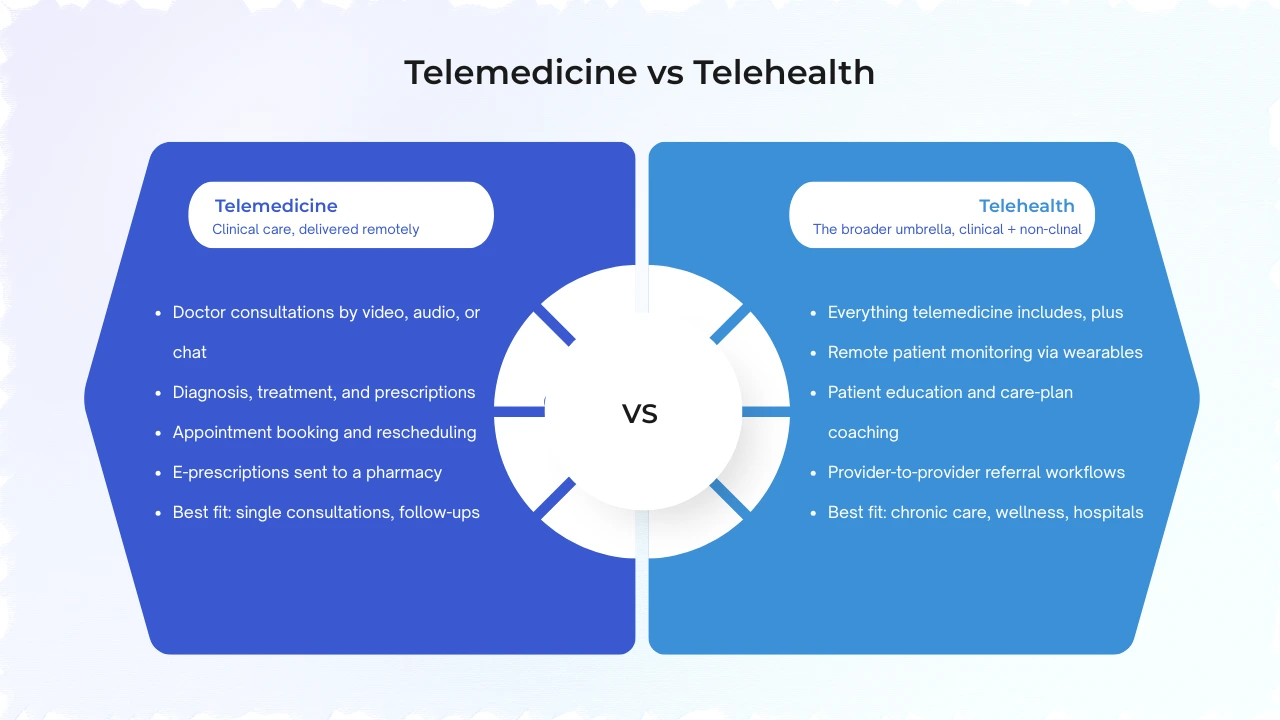
The two terms get used interchangeably, and most platforms today cover both, but they are not the same thing.
Telemedicine means clinical care delivered remotely: diagnosis, treatment, prescriptions. Telehealth is the wider category and also covers non-clinical services such as patient education, remote monitoring, wellness coaching, and provider training.
For a development team the distinction rarely changes the core stack. It changes the feature set, the data model, and how wide the compliance scope has to be, which is why it matters when you are scoping rather than naming the project.
What a telehealth build adds on top of a telemedicine app:
- Remote patient monitoring: Ingesting readings from wearables and home devices such as blood pressure cuffs, glucose monitors, and pulse oximeters, so care teams can see what happens between visits and get alerted when a value crosses a threshold.
- Patient education and coaching: Content libraries, care plans, and message threads that are not attached to a single consultation. Common in chronic disease and wellness programmes.
- Provider-to-provider workflows: Referral and second-opinion tools between clinicians, which matter far more to a hospital network than to a solo practice app.
- A wider integration surface: A telehealth platform usually talks to more systems than a consultation app does: labs, pharmacies, wearable APIs, and care coordination tools.
Security does not relax because a feature is non-clinical. Education content and device readings are still linked to a patient record, so encryption, role-based access, and audit logging apply across every module.
Synchronous vs Asynchronous Telemedicine
This choice changes your build more than most people expect, and it is worth settling before anything else.
Synchronous telemedicine is a live video or audio consultation, the digital version of sitting in a doctor’s room. It needs real-time video infrastructure, presence handling, a waiting-room flow, and scheduling that handles time zones correctly on both sides.
Asynchronous telemedicine, also called store-and-forward, lets a patient submit symptoms, photos, and history for a clinician to review and respond to later, usually within 24 to 48 hours. It needs queuing, response-time tracking, and structured intake forms, but no live video at all.
| Feature | Synchronous | Asynchronous |
| Core infrastructure | Real-time video, presence, waiting room | Queue, SLA tracking, structured intake |
| Build complexity | Higher | Lower |
| Typical use | Primary care, urgent care, mental health sessions | Dermatology, follow-ups, prescription refills |
| Time to launch | Longer | Shorter |
Most mature platforms support both: synchronous for urgent and primary care, asynchronous for dermatology, mental health follow-ups, and refills. If budget or timeline is tight, an asynchronous MVP is the shorter route to a working product that real patients use.
Types of Telemedicine Applications
Telemedicine is not one product. The platform you build should match the care context you are serving.
| Type | What it does | Real-world examples |
| Live video consultation | Real-time patient and doctor visit | Teladoc, Doctor on Demand |
| Store-and-forward | Patient submits data, clinician reviews later | Dermatology image review platforms |
| Remote patient monitoring | Continuous data from wearables and home devices | Cardiac and diabetes monitoring programmes |
| mHealth and self-management | Patient tracking and wellness | Chronic condition trackers, mental health apps |
| AI triage and symptom checking | Pre-consultation intake and urgency routing | Ada, Babylon Health |
Beyond platform type, the care segment shapes requirements:
- General practice and primary care: The highest-volume, most competitive segment. Speed, simplicity, and pharmacy or insurance integration decide adoption.
- Mental health: One of the fastest-growing categories, because removing the logistical and social friction of an in-person visit measurably increases how many people seek care.
- Chronic disease management: Video plus continuous monitoring, symptom tracking, and medication reminders, usually built around one condition.
- Specialty telehealth: Neurology, dermatology, orthopaedics, paediatrics, women’s health. Each has its own demands, such as high-quality image capture for dermatology or longitudinal symptom tracking for neurology.
- Post-acute and rehabilitation: Physical therapy over video has proven close to as effective as in-person care for many conditions.
- Veterinary telemedicine: Overlooked, and far less crowded than human healthcare. Pet owners want convenient digital care as much as anyone.
Transform Virtual Healthcare with a Custom Telemedicine Solution
Empower patients with seamless video consultations, digital prescriptions, appointment scheduling, and remote care—all within a scalable telemedicine app tailored to your needs.
Start Your Project
Features a Telemedicine App Needs
Every platform is built around three connected apps. Here is what belongs in each, and which items are genuinely non-negotiable.
Patient App
| Feature | Priority |
| Registration with medical history and insurance details | Must-have |
| Doctor search and filter by specialty, availability, language, rating | Must-have |
| Appointment booking with reminders and calendar sync | Must-have |
| Video and audio consultation that degrades gracefully | Must-have |
| Secure encrypted messaging with file and photo upload | Must-have |
| E-prescriptions routed to the patient’s pharmacy | Must-have |
| Medical records access and document upload | Must-have |
| Payments, co-pay handling, insurance workflows | Must-have |
| Wearable and device data sync | High value |
| AI symptom checker for pre-consultation triage | High value |
Doctor App
| Feature | Priority |
| Profile and availability control | Must-have |
| Full patient history and shared documents before the visit | Must-have |
| One screen for video, chat, and consultation notes | Must-have |
| Digital prescription creation with follow-up instructions | Must-have |
| Appointment management: accept, reject, reschedule | Must-have |
| EHR and EMR sync via HL7 FHIR | Must-have for hospitals and clinics |
| Multi-party video for family members, specialists, interpreters | High value |
| AI clinical decision support and drafted visit notes | High value |
Admin Panel
- User and role management across patients, providers, and staff
- Appointment flow and operational monitoring
- Usage and revenue reporting tied to real activity
- Data access controls aligned to healthcare privacy rules
- Integration oversight for labs, pharmacies, and insurers
A few features deserve more detail because they are where builds go wrong.
Video consultation is the centrepiece. It has to hold low latency and clear audio on variable connections. WebRTC with a HIPAA-eligible provider such as Twilio, Agora, or Vonage handles the infrastructure. The real work is wrapping it in a consultation flow that does not break when the signal drops.
Appointment scheduling should take a patient under two minutes from search to confirmation. Calendar integration and automated reminders are the cheapest no-show reduction available.
EHR integration is non-negotiable for any platform selling to established healthcare organisations, and it is the most technically demanding part of the build. More on this below.
How to Build a Telemedicine App: 7 Steps
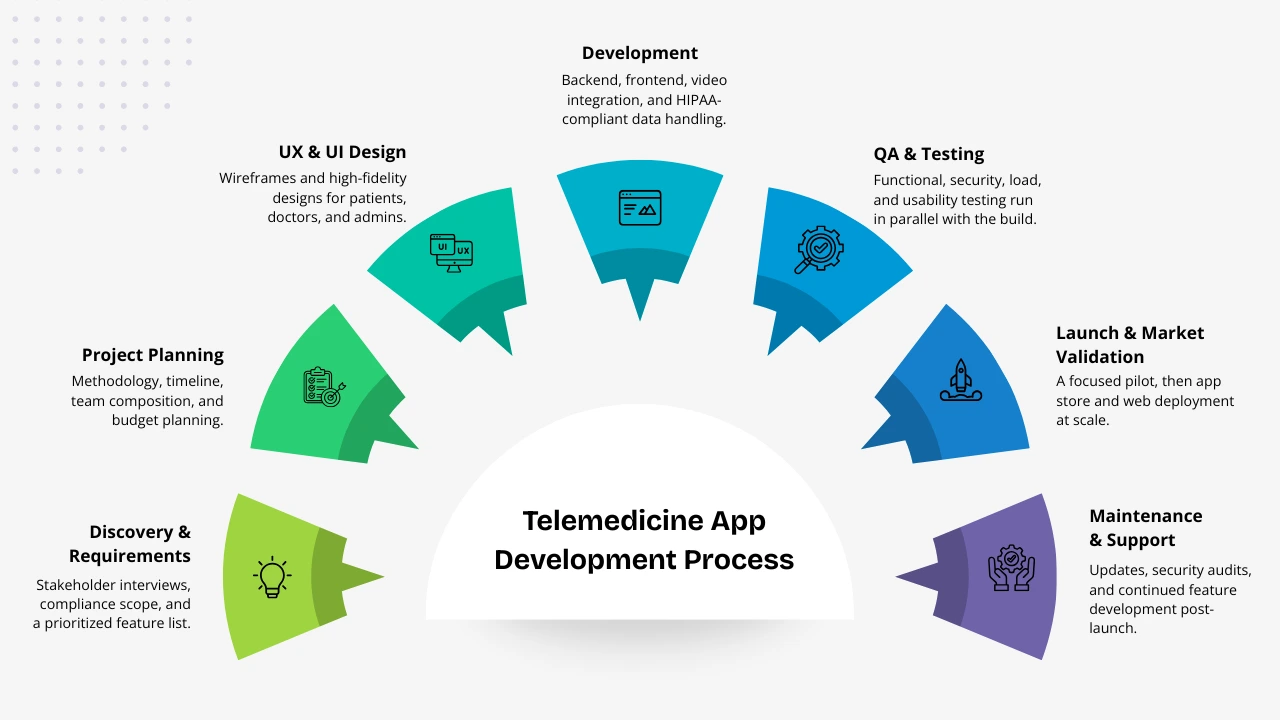
A telemedicine app is not a weekend sprint. Here is the sequence that works, and what actually happens at each stage.
Step 1: Define requirements and regulatory scope
Before writing a single requirement, decide which countries you will operate in, whether you will handle protected health information, and whether any feature performs a diagnostic function that could classify the app as a medical device.
Then document every user role (patient, provider, admin, specialist, care coordinator) and their workflows, and produce a prioritised feature list. This document becomes both your contract with the development team and your audit trail for compliance.
Doing this first is not bureaucracy. Compliance decisions made here shape the data model for the rest of the build.
Step 2: Plan the project and select the stack
Translate requirements into a delivery plan: methodology, timeline, risks, and team. Agile with two-week sprints works well here because clinical feedback arrives in waves.
Pick your video provider on one criterion first, which is whether they sign a Business Associate Agreement. Pick HL7 FHIR for EHR integration rather than a proprietary connector. Pick cloud infrastructure with healthcare compliance certifications, such as AWS, Google Cloud, or Azure in their HIPAA-eligible configurations.
Step 3: Design the UX for two very different users
Patient screens have to work across a wide age range and varying digital confidence. Provider screens have to be fast for someone working under time pressure who will abandon anything that adds clicks to their day.
Wireframe and test both before development. Doctor-facing interfaces built without clinician input are the most common cause of low provider adoption.
Step 4: Build the backend and compliance layer first
Encryption for all PHI channels. Audit logging for every data access event, recording who accessed which record, when, and from where. Data residency rules so US data sits on US servers and EU data on EU servers. Role-based access control on least privilege. A consent system that captures granular, explicit consent per data use.
Build this before the features sit on top of it. Retrofitting it later usually means re-architecting.
Step 5: Develop the core flows
Video consultation, appointment booking, and secure messaging are the three hardest surfaces.
Video must degrade gracefully, which means adaptive bitrate and automatic fallback to audio-only. Booking must handle time zone conversion correctly on both sides, which matters enormously for cross-border platforms. Messaging must store encrypted at rest with key management that still allows compliant deletion of PHI.
An MVP usually ships here, with the rest built in later sprints.
Step 6: Test for function, security, and compliance
Healthcare apps need more rigorous QA than consumer apps, and testing runs alongside development rather than at the end.
That means functional testing across every flow and edge case, a security risk assessment, penetration testing of the API, authentication, and file upload endpoints, load testing for peak usage, video testing under constrained network conditions, and usability testing with real clinicians.
Step 7: Launch, then iterate
Most platforms launch with a focused pilot, which might be one geography, one provider group, or one patient population, before scaling.
Budget two to three weeks for app store review, not two to three days. Apple and Google both apply extra scrutiny to health apps, including privacy nutrition labels and explicit PHI handling disclosures. Have your privacy policy and data processing agreements finished before you submit.
After launch, watch video call quality, appointment completion rates, prescription fulfilment, and patient satisfaction. Budget 15 to 20 percent of initial development cost per year for maintenance, because OS updates, API deprecations, and regulatory changes do not stop arriving.
Scoping a Telemedicine Build?
If you want a second opinion on feature scope, compliance markets, or realistic timelines, we are happy to talk it through.
Book a Free Consultation
How Long Does It Take to Develop a Telemedicine App?
| Build | Timeline |
| MVP with core consultation and scheduling | 3 to 5 months |
| Standard platform with video, scheduling, prescriptions, payments | 5 to 8 months |
| Advanced platform with EHR integration, RPM, and AI | 8 to 14 months |
Three things stretch a timeline more than anything else. EHR integration can add six to ten weeks on its own. Multi-country compliance work multiplies the legal and architectural review. An app store review for health apps runs weeks rather than days.
Tech Stack: What to Build a Telemedicine App With
The front end and back end are the straightforward part. What separates a telehealth build is the video, real-time, and interoperability layer.
| Layer | Options |
| Mobile (iOS) | Swift |
| Mobile (Android) | Kotlin |
| Cross-platform mobile | Flutter, React Native |
| Frontend web | React.js, Next.js, Vue.js |
| Backend | Node.js, Python (Django or FastAPI), .NET |
| Database | PostgreSQL, MongoDB |
| Real-time video | WebRTC with Twilio, Agora, Vonage, or Daily.co |
| Secure messaging | Firebase, custom WebSocket |
| Cloud | AWS, Google Cloud, Azure in HIPAA-eligible configurations |
| EHR integration | HL7 FHIR, Epic App Orchard, Cerner SMART |
| Authentication | OAuth 2.0, JWT, MFA |
| Payments | Stripe, Braintree |
| Encryption | AES-256, TLS |
For most projects serving both iOS and Android, Flutter or React Native gives the best balance of speed, cost, and performance. Native development earns its cost when you need specialised hardware integration or already have a large native user base.
One caveat on video: pick the provider that will sign a BAA before you pick the one with the nicest SDK. Standard Zoom and Google Meet are not HIPAA-compliant without a BAA and configuration changes, and teams discover this later than they should.
EHR Integration and Interoperability
A telemedicine app that cannot talk to the systems a clinic already runs creates double the work for every member of staff.
HL7 and FHIR are the standards that let healthcare systems exchange data. FHIR is the modern one and is increasingly required for participation in US federal programmes. Build to it rather than writing custom connectors, because proprietary integrations work right up until the hospital upgrades.
EHR and EMR sync means consultation notes, prescriptions, and history stay consistent across your app and the records system, so there is one source of truth per patient. Epic, Cerner, and Athenahealth all run developer programmes for third-party integration.
Lab and pharmacy connections push prescriptions out and pull results back in.
Payment and insurance systems handle processing, eligibility checks, and claims. Multi-payer support matters a great deal in the US market.
Wearables and devices feed remote monitoring through HealthKit, Google Fit, and device-specific APIs.
Compliance: HIPAA, GDPR, DPDP, and the Rest
Compliance is not a feature you add at the end. It decides how the platform is architected, which is why Step 1 above is about regulatory scope rather than features.
United States: HIPAA and HITECH
Applies to any platform handling protected health information in the US. The core requirements are encryption in transit and at rest, role-based access control, comprehensive audit logs, signed Business Associate Agreements with every vendor touching PHI, breach notification procedures, and regular security risk assessments. HITECH strengthens enforcement and matters particularly for platforms handling electronic health records.
European Union: GDPR and MDR
GDPR treats health data as a special category requiring explicit consent, data minimisation, purpose limitation, and the right to erasure. Separately, if any feature performs a diagnostic function, the Medical Device Regulation may classify your app as a medical device, which triggers CE marking. Get regulatory legal review before an EU launch.
India: DPDP Act 2023 and the Telemedicine Practice Guidelines
The Digital Personal Data Protection Act governs how patient data is collected, processed, and stored for platforms serving Indian users. It sits alongside the Telemedicine Practice Guidelines 2020 issued by the NMC and MoHFW, which set the rules clinicians and platforms must follow for lawful telemedicine practice in India, covering consent, prescribing limits, and record-keeping.
Canada: PIPEDA
Requires explicit informed consent for data collection, the right to access and correct personal information, and clear retention and deletion policies. Provincial health privacy laws add more on top, such as PHIPA in Ontario and HIA in Alberta.
UAE: MOHAP
Telemedicine platforms operating in the UAE need a telemedicine licence, patient data stored on UAE-hosted or approved cloud infrastructure, and a cybersecurity audit.
Standards buyers ask for
ISO 27001 and SOC 2 are not laws, but enterprise healthcare buyers increasingly ask for one or both before signing. PCI DSS applies if you process card payments. The 21st Century Cures Act matters for interoperability in the US.
Bring a compliance specialist in at the start rather than handing them a finished product. Retrofitting compliance is expensive and usually means re-architecture.
How Much Does It Cost to Build a Telemedicine App?
| Build | Cost | Timeline |
| MVP / basic telemedicine app | $30,000 to $75,000 | 3 to 5 months |
| Standard platform (video, scheduling, prescriptions) | $75,000 to $150,000 | 5 to 8 months |
| Advanced platform (EHR integration, RPM, AI) | $150,000 to $300,000+ | 8 to 14 months |
What drives the number: platform scope (web only versus web plus native iOS and Android), feature complexity, how many third-party integrations you need, which compliance regimes apply, team location, and ongoing maintenance at roughly 15 to 20 percent of build cost per year.
For a breakdown by individual feature and region, see our telemedicine app development cost guide.
Five Mistakes That Sink Telemedicine Builds
1. Treating compliance as a final review: Retrofitting HIPAA or DPDP into a finished platform usually means re-architecting the data layer. Decide your markets in week one, not month six.
2. Using video tools that are not HIPAA-eligible: Standard Zoom and Google Meet do not come with a BAA. Teams find this out after launch more often than you would think.
3. Writing custom EHR connectors instead of using FHIR: Proprietary integrations work until the hospital upgrades, and then you own a maintenance problem with no upstream support.
4. Designing for good connections only: A large share of telemedicine users connect over patchy mobile networks. If video does not fall back to audio automatically, they stop opening the app.
5. Building doctor-facing screens without doctors: Provider interfaces built from assumptions fail adoption. Clinicians work under time pressure and abandon anything that adds clicks.
AI in Telemedicine: Where It Actually Helps
AI is worth adding where it saves a clinician time or catches something earlier. Everywhere else it is decoration.
Symptom Triage
A conversational intake flow before the consultation collects structured symptom data, flags urgent cases for immediate routing, and gives the attending clinician a head start. Build it on a medical NLP model rather than a rules-based decision tree, because coverage and flexibility are far better. The diagnosis stays with the doctor.
Remote Monitoring With Alerting
Connect wearables through HealthKit and Google Fit, then run anomaly detection against the incoming time-series data and alert the care team when vitals cross patient-specific thresholds. This has the clearest clinical ROI of any AI feature, because catching deterioration early prevents expensive hospitalisations.
Ambient Clinical Documentation
AI transcription during a consultation that produces structured notes automatically. HIPAA-compliant options exist from providers such as Nuance DAX and AWS HealthScribe. Doctors edit rather than write from scratch, and it is one of the strongest satisfaction drivers on physician-facing platforms.
Healthcare Chatbots
These handle the repetitive load: common questions, booking, reminders, around the clock without adding staff.
Monetization Models That Work
A telemedicine platform that does not generate sustainable revenue will not survive long enough to serve patients well. Here are the models that work.
Pay-per-Consultation
The simplest and most transparent model. Patients pay per appointment and the platform keeps a percentage. Works for infrequent users who want on-demand care without commitment.
Subscription Plans
Predictable revenue and better retention. Monthly or annual plans can include unlimited or discounted consultations, priority booking, or specialist access. Tiering lets you serve different segments.
Insurance Reimbursement Integration
Close to essential for US adoption. Handling insurance billing inside the platform rather than making patients claim it back significantly increases conversion.
B2B and Enterprise Licensing
Selling to hospital networks, employer health programmes, or insurers. Larger deals, longer sales cycles, far more stable revenue.
Freemium
Basic consultations free or low-cost, with specialist access, longer consultations, or enhanced monitoring behind paid tiers. Suits broad consumer platforms.
In-App Pharmacy and Diagnostics
Partner with pharmacy networks or labs and earn margin or referral fees on fulfilled orders.
Looking for Telemedicine App Solution?
Our team specializes in developing compliant telemedicine applications that help healthcare organizations expand access to care and improve patient experiences.
Get a Custom Quote
Who Builds Telemedicine Apps, and Who Uses Them
Telemedicine apps are built by and for hospitals and health systems, private clinics and specialty practices, individual doctors, pharmacies, diagnostic labs, home care providers, and healthtech startups.
The most common use cases are follow-up appointments, non-emergency consultations, chronic condition check-ins, mental health sessions, prescription refills, and remote monitoring of patients using wearables or home devices.
Building It Yourself vs Hiring a Team
If you have in-house engineers who have shipped a healthcare product before, an internal build gives you the most control. What usually stops teams is not the app itself. It is the compliance architecture and the EHR integration, which are specialist work.
If you are hiring out, the thing to check is not portfolio size but whether the team has shipped something that handles PHI. Four questions separate healthcare teams from general app shops quickly:
- Who signs the Business Associate Agreement?
- Which video provider do you use, and is it HIPAA-eligible?
- Have you completed a FHIR integration, and with which EHR?
- How do you handle data residency across markets?
If you want to talk through scope for your own build, our telemedicine app development team can walk through requirements with you.
Conclusion
Telemedicine is becoming the default way patients expect to reach a doctor for anything that does not need a physical exam. The platforms that work are the ones with video that survives a bad connection, compliance designed in from day one, and a feature set matched to what the business actually needs rather than to a feature list copied from a competitor.
The telemedicine versus telehealth distinction matters most at the planning stage, not the branding stage. Get the scope right early and the compliance work, the tech stack, and the team you hire all follow from it.
Frequently Asked Questions
How do I build a telemedicine app?
How long does it take to develop a telemedicine app?
How much does it cost to build a telemedicine app?
What features does a telemedicine app need?
What makes a telemedicine app HIPAA compliant?
What is the difference between telemedicine and telehealth?
Can a telemedicine app connect to an existing EHR?
What is the difference between synchronous and asynchronous telemedicine?
Which tech stack is best for a telemedicine app?
Do telemedicine apps need approval from app stores?

Mr. Saddam Husen, (CTO)
Mr. Saddam Husen, CTO at Comfygen, is a renowned Blockchain expert and IT consultant with extensive experience in blockchain development, crypto wallets, DeFi, ICOs, and smart contracts. Passionate about digital transformation, he helps businesses harness blockchain technology’s potential, driving innovation and enhancing IT infrastructure for global success.