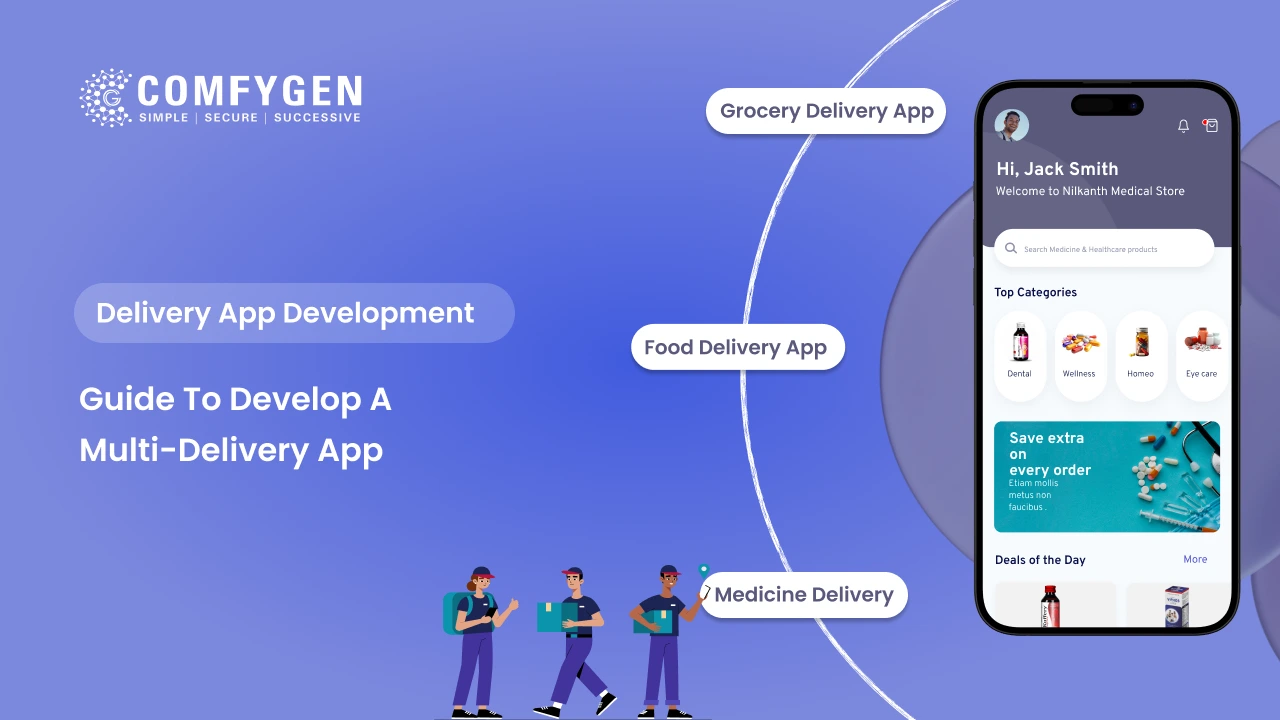





A multi-delivery app lets customers order food, groceries, medicine, parcels and other services from one app, with one login, one wallet and one delivery fleet. To build one, launch with a single strong service, build a shared core that every service can use, then add new services one at a time as demand grows. An MVP with one service and a shared core usually costs $15,000 to $30,000. A platform with four to six services costs $80,000 to $150,000+.
This guide is for founders and businesses in the USA, UK, UAE, Canada and India who want to build an all-in-one delivery platform. It covers which services to start with, how the app is built, what it costs, and the rules to plan for in each market.
What Is a Multi-Delivery App?
A multi-delivery app, also called a multi-service delivery app or all-in-one delivery app, combines several delivery services in one platform. A customer might order dinner, a week of groceries and a pharmacy refill without switching apps.
The best-known examples started with one service and grew:
| App | Market | Started With | Added Later |
| Gojek | Indonesia and Southeast Asia | Motorbike rides | Food (GoFood), groceries (GoMart), parcels (GoSend), payments |
| Grab | Southeast Asia | Ride-hailing | Food, groceries, parcels, payments |
| Careem | UAE and Middle East | Ride-hailing | Food, groceries, parcels, payments |
| Swiggy | India | Food delivery | Instamart groceries, Genie pick-up and drop |
| Rappi | Latin America | Grocery delivery | Restaurants, pharmacy, cash services |
| Glovo | Europe and Africa | Courier “anything” delivery | Restaurants, groceries, pharmacy |
Every one of them built a large user base on one service before adding more. That pattern is the most important lesson for anyone building a multi-service app.
Multi-Delivery App vs Multi-Vendor App vs Super App
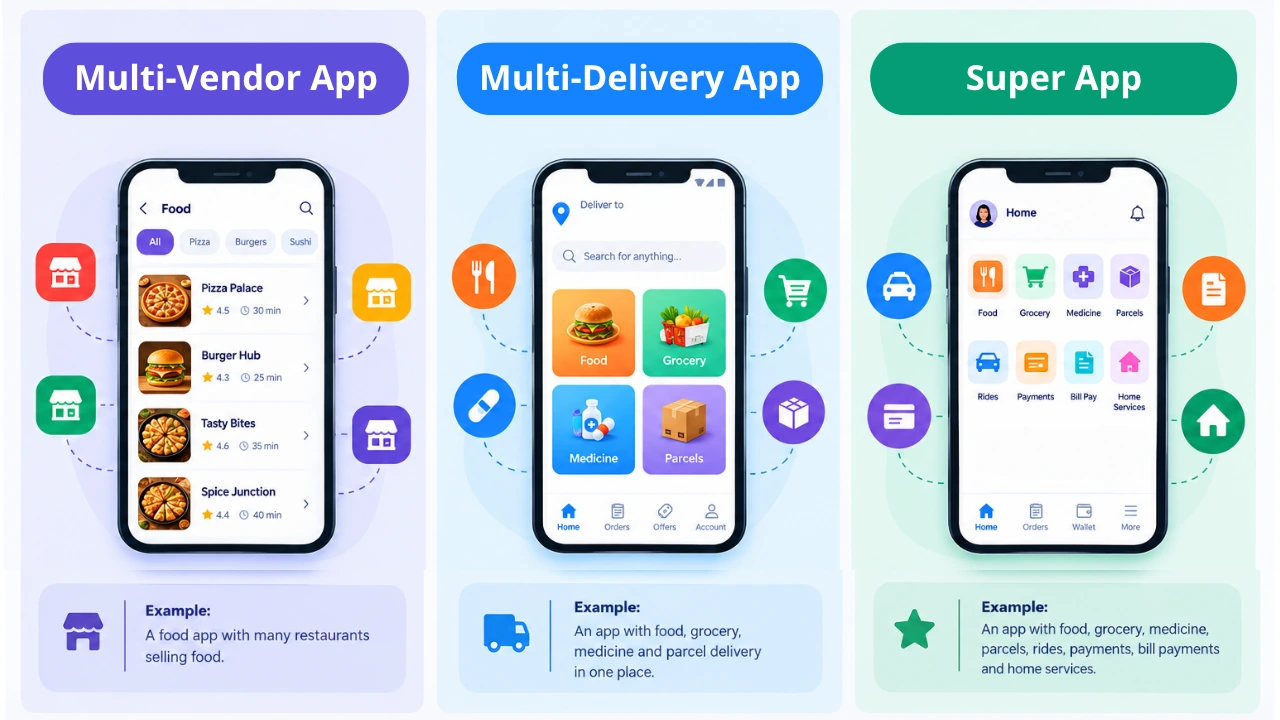
These terms are often mixed up:
- Multi-vendor app: Many stores selling one type of product, like many restaurants in one food app.
- Multi-delivery app: Several delivery categories, like food, grocery, medicine and parcels, in one app.
- Super app: A multi-delivery app that also adds non-delivery services, such as rides, payments, bill payments or home services.
Most businesses should aim for a multi-delivery app first. A full super app needs a very large user base before the extra services pay off.
Which Services Should You Launch First?
Pick your first service based on two things: how often people order and how much they spend per order.
| Service | Order Frequency | Average Order Value | Best Role |
| Food delivery | High (several times a week) | Low to medium | Anchor service that builds daily habits |
| Grocery delivery | Medium (weekly) | High | Anchor or second service |
| Milk and water subscriptions | Very high (daily) | Low | Strong add-on for repeat use |
| Medicine delivery | Low to medium | Medium | Trust-building add-on |
| Courier and parcels | Low | Medium | Add-on that uses spare rider time |
| Alcohol delivery | Low | High | Add-on where laws allow |
| Meat and fish | Medium | Medium | Add-on for grocery users |
A practical launch order:
1. Start with one anchor service: Food or grocery usually works best because people order often. Your first service should be one where you already have supply, such as restaurant partners or a store network.
2. Add a second service that shares the same riders: Grocery after food, or food after grocery, lets riders carry more orders in quiet hours.
3. Add low-effort extras: Parcels, pharmacy and subscriptions use the same riders and customers with little new supply work.
Each service needs its own flow. That’s why teams building food ordering and delivery platforms plan kitchen prep times, while grocery apps with slot booking need stock sync and item substitutions. Medicine delivery apps need prescription checks, and courier and parcel apps plan two-stop pickup and drop routes.
How a Multi-Delivery App Is Built: Shared Core and Service Modules
The smartest way to build a multi-service app is to split it into a shared core and service modules. You build the core once, and every new service plugs into it.
What the Shared Core Includes
- One user account and login for every service
- One wallet, saved cards and loyalty points
- One rider fleet and dispatch system
- One admin panel for all vendors, riders and orders
- Shared notifications, support chat and ratings
- Shared maps, routing and tracking
What Each Service Module Adds
| Module | Service-Specific Features |
| Food | Restaurant menus, add-ons, prep-time sync, short delivery windows |
| Grocery | Large catalogues, stock sync, delivery slots, substitutions |
| Pharmacy | Prescription upload and checks, licensed pharmacy list, privacy controls |
| Parcel | Pickup and drop addresses, parcel size and weight, proof of pickup and delivery |
| Alcohol | Age verification, ID scan at delivery, licence checks, time limits |
| Subscriptions | Daily or weekly schedules, pause and skip, monthly billing |
This setup means adding a new service costs far less than building a separate app. It also keeps your data in one place, so you can see which food customers also buy groceries.
One Cart or Separate Checkouts?
Most multi-delivery apps use a separate checkout for each service. A food order and a grocery order come from different places, need different delivery times and often go with different riders. Mixing them in one cart confuses customers when half their order arrives late.
A single shared cart works only when every item ships from the same store or dark store.
Must-Have Features of a Multi-Delivery App
A multi-service platform has four panels. Here’s what each needs at launch.
Customer App Features
- One home screen with every service as a clear tile
- Search across services, with results grouped by category
- Saved addresses and map-pin drop for hard-to-find locations
- Live order tracking with ETAs
- One wallet plus cards, UPI, Apple Pay, Google Pay and cash on delivery where allowed
- Scheduled orders and one-tap reorders
- Ratings for stores and riders
- Language options for your market, such as Arabic in the UAE or Hindi in India
Rider App Features
- Orders from any service in one queue, clearly labelled by type
- Accept or reject with clear pickup and drop details
- Built-in navigation and multi-stop routes
- Proof of delivery with photo, signature or OTP
- ID check screens for alcohol and prescription orders
- Daily and weekly earnings with a payout history
Vendor Panel Features
- Separate dashboards for restaurants, stores and pharmacies
- Order alerts, accept and mark-ready buttons
- Menu, catalogue and stock updates
- Sales reports and payout tracking
Admin Panel Features
- Service settings: turn services on or off by city or zone
- Commission and delivery-fee rules for each service
- Vendor and rider onboarding with document checks
- Offers, coupons and loyalty programmes across services
- Reports on cross-service use, such as how many food customers also order groceries
Advanced Features That Help a Multi-Service App Grow
- Smart dispatch across services: Gives a rider a parcel pickup between two food orders, so quiet time earns money.
- Cross-service recommendations: Suggests groceries to people who order breakfast often, or pharmacy refills on a monthly cycle.
- Order batching: Groups nearby orders for one rider, which matters most for grocery and parcels.
- Membership plans: One subscription for free delivery across all services, which drives repeat use.
- Multi-currency and multi-language support: Needed if you plan to launch in more than one country.
Many teams add these gradually, because most AI features for delivery platforms need a few thousand orders of data before they work well.
Create an App That Handles Every Delivery
Build one platform for food, groceries, parcels, and more, with features tailored to your delivery operations.
Discuss Your App
Business Models and Revenue Streams
Choosing a Business Model
| Model | How It Works | Best For |
| Aggregator | Other businesses list their stores, and you take a commission | Startups that want many services fast |
| Single brand | You sell your own products across categories | Retail chains and brands with their own stock |
| Hybrid | You sell your own products and host partner stores | Businesses scaling across cities |
The right fit depends on your supply and budget, and comparing delivery app business models side by side helps before you commit to one.
How Multi-Delivery Apps Make Money
- Vendor commissions on each order
- Delivery fees paid by customers
- Membership plans with free or cheaper delivery
- Sponsored listings where stores pay to appear higher
- Peak-hour pricing during high demand or bad weather
- Service fees on small orders
The real advantage of a multi-service app is repeat use. A customer who orders food twice a week and groceries once a week opens your app far more often than a single-service user, which lowers your marketing cost per order.
Rules to Plan for by Market
Rules change by country and service. Check local law before launch, but plan for these from the start:
| Market | Key Rules to Plan For |
| USA | Alcohol delivery laws vary by state, with ID checks at the door. Pharmacy delivery needs licensed pharmacy partners. State privacy laws like California’s CCPA apply. |
| UK | Age verification at delivery for alcohol. Medicine delivery through registered pharmacies. UK GDPR for customer data. |
| UAE | Trade licence for your delivery activity. Arabic language support. Alcohol delivery is tightly limited, and medicine delivery needs licensed pharmacy partners. Local payment gateways. |
| India | FSSAI registration for food, licensed pharmacies for medicine, GST invoices, and the DPDP Act 2023 for personal data. Alcohol delivery is allowed only in some states. |
Founders launching in the Gulf also need Arabic interfaces and local payment methods, because delivery apps built for the UAE market must support right-to-left layouts and regional gateways like Telr or Checkout.com.
How to Build a Multi-Delivery App: Step by Step
Step 1: Research Your Market and Supply
Pick one city or zone. List the restaurants, stores and pharmacies you can sign up, and talk to 20 target customers about what they order most often. Supply is usually harder to get than users.
Step 2: Choose Your Anchor Service and Business Model
Use the frequency and order-value table above to pick your first service. Decide whether you’ll run an aggregator, single-brand or hybrid model.
Step 3: Design the Shared Core First
Plan the login, wallet, rider fleet, dispatch and admin panel so that every future service can use them. This step decides how cheaply you can add services later.
Step 4: Build the First Service Module
Build only the anchor service at launch, with its customer, rider, vendor and admin features. Leave the other service tiles hidden until they’re ready.
Step 5: Connect Payments, Maps and Messaging
Most apps use Stripe, Razorpay or local gateways for payments, Google Maps or Mapbox for routing, and Twilio or WhatsApp for order updates.
Step 6: Test With Real Orders
Run live test orders with real vendors and riders. Check payment failures, refunds, cancellations and weak-signal areas before launch.
Step 7: Soft Launch in One Zone
Open in one area for a few weeks, fix problems daily and grow zone by zone. Leave time for app store approval and rider training, since those two steps delay almost every delivery app launch.
Step 8: Add Services One at a Time
Add your second service only when the first one runs smoothly and riders have spare capacity. Repeat for each new service.
Tech Stack for Multi-Service Delivery App Development
| Layer | Recommended Options |
| Mobile apps | Flutter, React Native, Swift, Kotlin |
| Web dashboards | React.js, Next.js |
| Backend | Node.js, Python, microservices for each service module |
| Database | PostgreSQL, MongoDB |
| Live tracking | Redis, WebSockets |
| Maps and routing | Google Maps Platform, Mapbox |
| Payments | Stripe, Razorpay, Checkout.com, PayPal |
| Messaging | Twilio, WhatsApp Business API, Firebase Cloud Messaging |
| Cloud | AWS, Google Cloud, Azure |
A microservices backend works well for multi-service apps, because each service module can scale on its own. If grocery orders spike on a weekend, only the grocery service needs more capacity.
How Much Does Multi-Delivery App Development Cost?
A multi-delivery app costs $15,000 to $150,000+ with an India-based team. The price depends on the number of services, the size of the shared core and your target markets.
| Build Stage | What’s Included | Cost | Time |
| MVP | Shared core plus one service (customer, rider, vendor and admin apps) | $15,000 to $30,000 | 3 to 4 months |
| Growth platform | Shared core plus 2 to 3 services, wallet and offers | $40,000 to $80,000 | 5 to 7 months |
| Full platform | 4 to 6 services, memberships, AI dispatch, multi-city or multi-country | $80,000 to $150,000+ | 8 to 12 months |
Each extra service module usually adds $8,000 to $20,000, depending on how different it is from your existing services. A parcel module costs less to add than a pharmacy module with prescription checks.
The same work costs more with teams in other regions:
| Region | Typical Hourly Rate |
| India | $20 to $50 |
| Eastern Europe | $40 to $99 |
| UK and Western Europe | $80 to $180 |
| USA and Canada | $100 to $250 |
On top of the build, plan for monthly maps, messaging and hosting fees, plus 15% to 20% of the build cost each year for maintenance. The same factors that shape the cost of building a delivery app, such as the number of panels, platforms and integrations, apply to every service module you add.
Custom Build or White-Label?
A white-label multi-service app can launch in weeks at a lower upfront cost, but you’ll have less control over workflows and may pay licence fees. A custom build takes longer, but you own the code and can shape every service around your market. Many founders test demand with a white-label app and move to custom software once order volume grows.
Common Mistakes to Avoid
- Launching five or more services at once with thin supply in each
- Building separate apps for each service instead of one shared core
- Putting items from different stores in one cart
- Ignoring alcohol and pharmacy laws until after launch
- Underpaying riders, which leads to slow deliveries in every service
- Copying Gojek’s service list for a market with different needs
Why Businesses Choose Comfygen for Multi-Delivery App Development
Comfygen’s on-demand delivery app work covers food, grocery, medicine, parcels, milk and water subscriptions, and quick commerce, from single-store apps to multi-city platforms. Since 2019, the team has delivered 550+ projects for 400+ clients in 30+ countries, and 97% of clients come back for their next project. Offices in Jaipur, Toronto and Euskirchen give clients in North America and Europe a local contact point.
Every multi-service project starts by choosing the right anchor service and designing a shared core that makes each future service cheaper to add. If you’re planning an all-in-one delivery platform, you can book a free scoping call with Comfygen’s delivery team to map your first service, budget and launch timeline.
Frequently Asked Questions
What is a multi-delivery app?
How much does it cost to build a multi-delivery app?
How long does it take to build a multi-service delivery app?
Which service should a multi-delivery app launch first?
How do I build an app like Gojek?
What's the difference between a multi-delivery app and a super app?
Can I launch a multi-delivery app in several countries?

Mr. Saddam Husen, (CTO)
Mr. Saddam Husen, CTO at Comfygen, is a renowned Blockchain expert and IT consultant with extensive experience in blockchain development, crypto wallets, DeFi, ICOs, and smart contracts. Passionate about digital transformation, he helps businesses harness blockchain technology’s potential, driving innovation and enhancing IT infrastructure for global success.