




Most founders asking how to build a car wash app start with the same question: what features do we need? It’s a fair place to begin. Still, after building a few of these platforms, we’ve learned the better first question is what order to build things in, and how long each piece really takes. That’s the part that decides whether you launch in three months or nine.
So this guide walks through the whole process, from the first validation call to the day it goes live. You’ll get the feature list broken down by panel, the ten steps we actually follow, a week-by-week timeline, tech stack options, and the mistakes that quietly push launch dates back.
Quick answer: To build a car wash app, you need three connected apps: a customer booking app, a washer app, and an admin panel. Most builds follow ten steps and take three to five months. A lean MVP, though, can launch in six to ten weeks.
One note before we start. Plenty of people searching how to build a car wash app are really asking what it costs, and car wash app development cost is a big enough topic that we handle it separately. This guide focuses on the build itself.
What Is a Car Wash App, and Which Type Should You Build?
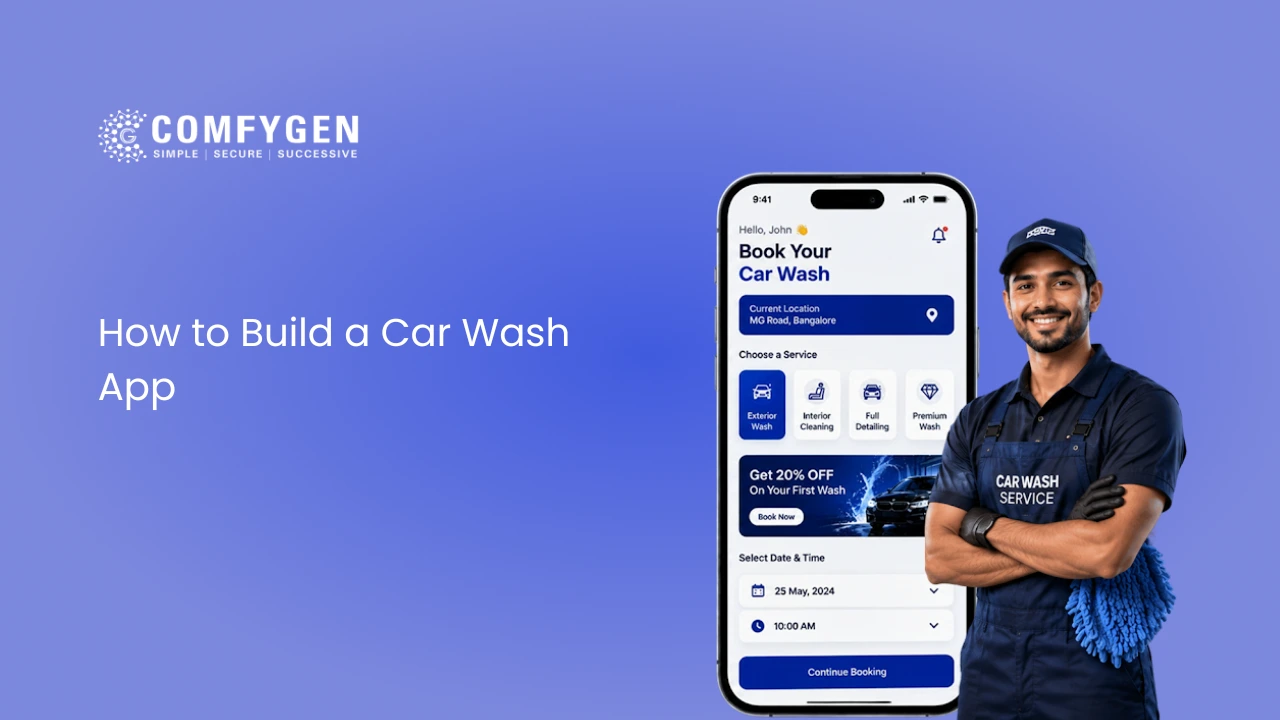
Before working out how to build a car wash app, decide which kind you’re building. A car wash app connects vehicle owners with washing services through their phone. Beyond that shared definition, however, there are three fairly different products people call by the same name:
- Fixed-location booking app: Customers reserve a slot at your physical wash location. Simplest to build, since there’s no travel logistics to manage.
- On-demand or doorstep app: Washers travel to wherever the customer’s car is parked. Adds location matching and live tracking.
- Marketplace or aggregator app: Your platform connects customers to many independent providers. Most complex, because you’re managing supply as well as demand.
Here’s the one question that decides your path: are you providing the wash yourself, or connecting customers to people who do?
Answer that before anything else. Your answer changes your location logic, your matching system, and whether you need payout handling at all. Get it wrong at the start and you’ll be rebuilding the backend two months in, which is exactly the kind of rework nobody budgets for.
Must-Have Car Wash App Features (All Three Panels)
A car wash app isn’t really one app. It’s three interfaces that talk to each other, which is the single biggest thing people miss when planning how to build a car wash app. Below is what belongs in each, along with what can wait.
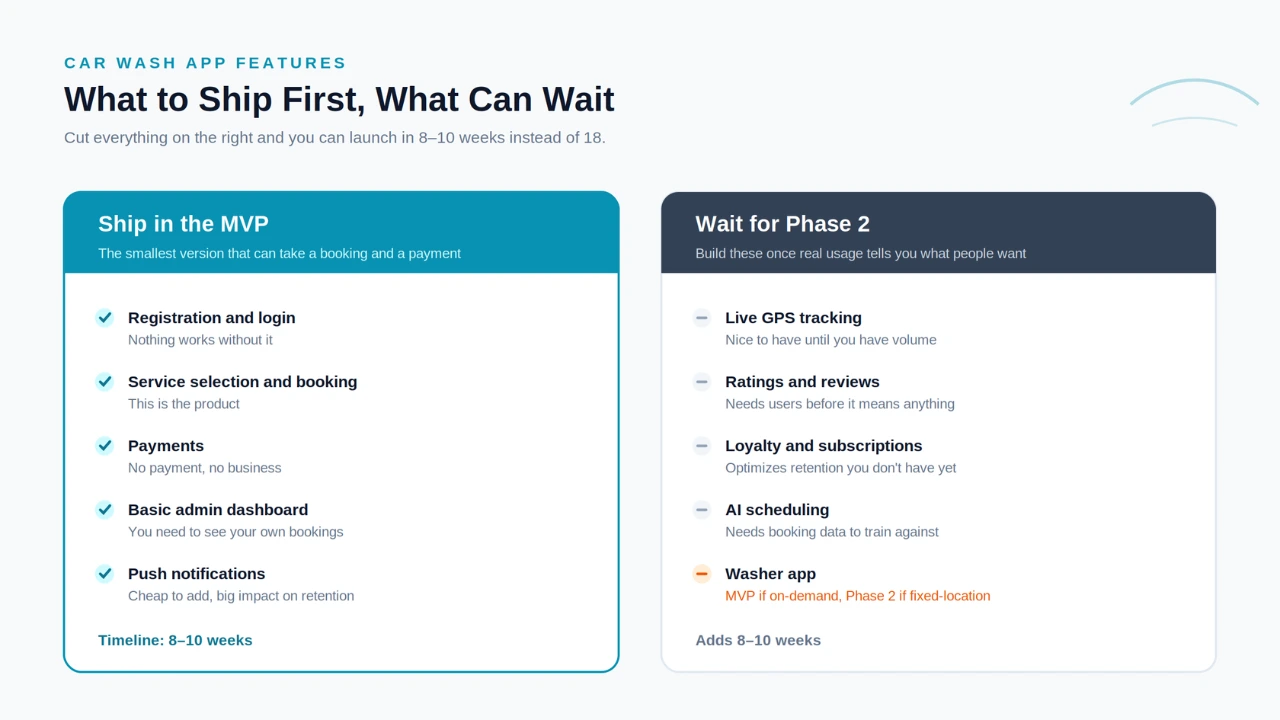
Customer App
This is where your revenue comes from, so it gets the most attention early:
- Registration and login, ideally with a social sign-in option
- Service selection with packages and add-ons
- Scheduling, either instant or for a future slot
- Location or address entry
- Secure payments
- Booking status and past order history
- Ratings and reviews
- Push notifications for reminders and status changes
Washer or Technician App
Without this panel, your washers end up coordinating by phone call, which is the exact problem the app was meant to solve:
- Job alerts with accept or decline
- Availability settings and service area
- Navigation to the customer’s location
- Job status updates from accepted through completed
- Photo proof of finished work, which cuts disputes more than any other single feature
- Earnings tracker and payout requests
Admin Panel
Your control room. Without it, you have no real visibility into what’s happening:
- Booking oversight across all technicians
- Customer and washer account management
- Service and pricing setup
- Payment tracking and payouts
- Analytics dashboard
- Promotions and discount codes
- Dispute handling
How to Build a Car Wash App: The 10-Step Development Process
Below is the exact sequence we follow. Each step includes a realistic time range, because a step list without durations doesn’t help anyone plan.
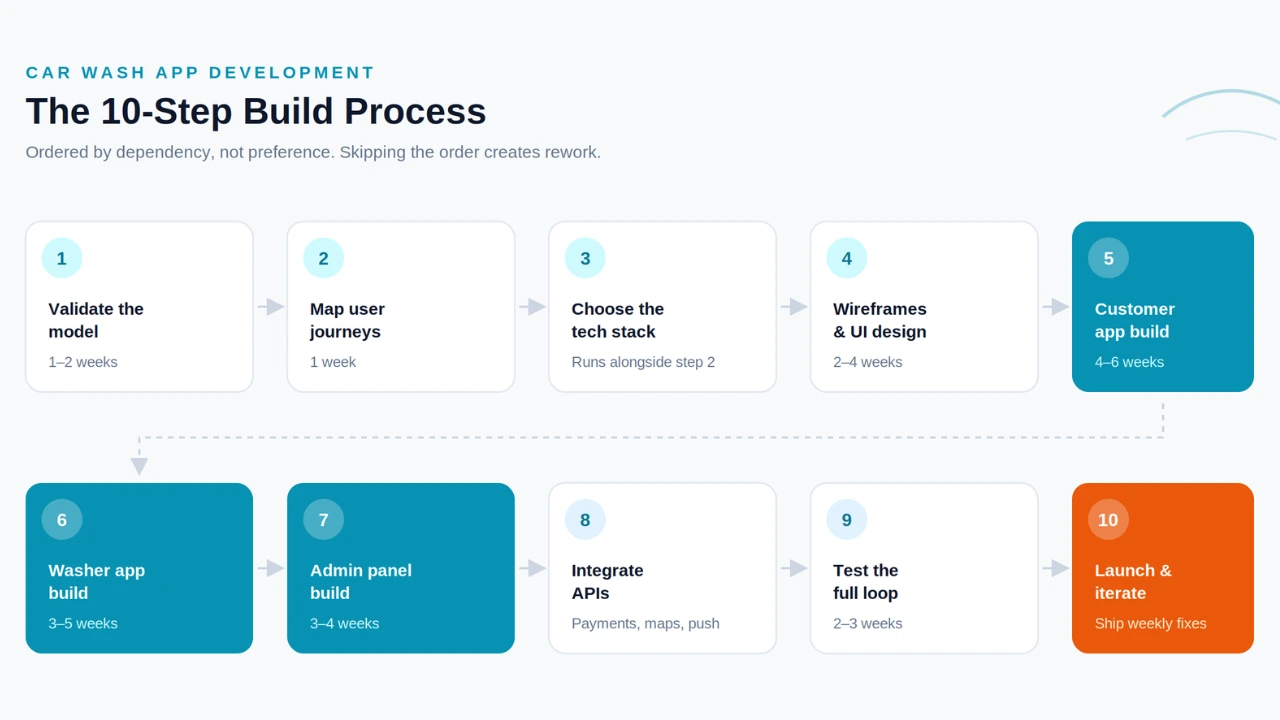
1. Validate The Model (1–2 weeks)
Talk to ten or fifteen actual customers or car wash owners before writing a single spec. Ask what they’d pay and how often they’d use it.
The broader demand is well documented: the global car wash services market was worth $36.3 billion in 2025 and is forecast to reach $54.5 billion by 2033, growing at 5.1% a year.
In the US, roughly 66% of vehicle owners already pay for professional washes at least twice a month, and cashless payment is now the largest segment of that spending.
Those numbers confirm the category works. They say nothing, however, about whether your specific version does, which is exactly what this step is for. It gets skipped constantly, and it’s the cheapest one to do.
Step 2: Map Every User Journey (1 week)
Write out all three journeys screen by screen: customer, washer, admin. Paper works. So does a whiteboard.
The point isn’t the artifact, it’s the argument. Every disagreement about scope surfaces here, where it costs an afternoon, or it surfaces in week nine, where it costs a sprint.
Step 3: Choose the Tech Stack
Runs alongside step two rather than after it, since the journeys you just mapped determine what the stack needs to do. A fixed-location booking app and a live-tracking on-demand app pull in very different directions.
Worth getting right the first time, because switching later isn’t an adjustment. It’s a rebuild. We cover the options further down.
Step 4: Design Wireframes and UI (2–4 weeks)
Low-fidelity wireframes first, then a clickable prototype. Then get sign-off in writing before a developer touches anything.
That last part sounds bureaucratic. It isn’t. Changing a screen in Figma costs an afternoon, and changing the same screen once it’s built costs a week. We’ve watched clients skip the prototype to save two weeks and lose four.
Step 5: Build the Customer Booking App (4–6 weeks)
Registration, service selection, scheduling, payment. That’s the list. Resist adding to it.
This is your actual MVP, and on launch day it’s the only piece bringing money in. Everything else in the system exists to support what happens here.
Step 6: Build the Washer App (3–5 weeks)
Job alerts, accept and decline, navigation, status updates, earnings. Development usually overlaps with step five once the booking APIs settle down.
Build it after the customer app, never before. We’ve seen teams start here because the washer app feels simpler, and it goes badly every time: a washer app has nothing to show until bookings exist, so you end up building against mock data and reworking it later.
Step 7: Build the Admin Panel (3–4 weeks)
Booking oversight, user management, pricing setup, payouts. This runs in parallel with steps five and six, since it reads from the same data those two are already producing.
Teams treat this as the optional one. Then they launch and find themselves checking on the business by querying the database directly, which works for about a week.
Step 8: Integrate Third-Party Services (1–2 weeks)
Payments, maps, push notifications, and cloud storage all get wired up here.
One caveat: pick your payment provider back in step three, not now. Gateways differ in how they handle authentication, refunds, and split payouts. Build a checkout flow around the wrong assumptions and you’ll rebuild it, which is a miserable way to spend week twelve.
Step 9: Test the Full Loop (2–3 weeks)
Book, assign, complete, pay, review. End to end, all three panels talking to each other.
Testing panels one at a time feels thorough and misses the bugs that matter. The failures that reach real users almost always live in the handoffs: a booking that assigns but never notifies, a completed job that doesn’t trigger payout. You only catch those by running the whole loop.
Step 10: Launch and Iterate (ongoing)
Submit to both app stores, then plan on shipping fixes weekly through your first month live.
Your first hundred real users will find things no QA pass caught. That’s normal. Budget time for it upfront instead of treating it as a surprise.
Why this order: it follows dependencies, not preference. Design has to come before development. Booking logic has to come before the washer app. Integrations need stable APIs to plug into. When a team reshuffles this to save time, the time comes back as rework, usually with interest.
Take Your Car Wash Business Online
Build an easy-to-use app that helps customers book washes, make payments, and keep coming back.
Build Your App
Car Wash App Development Timeline: Phase-by-Phase Roadmap
When people ask how to build a car wash app on a fixed deadline, this is the schedule we point them to. It assumes the three panels are built in parallel:
| Phase | Weeks | Deliverable |
| Discovery and validation | 1–2 | Locked model and feature list |
| UX mapping and wireframes | 2–4 | Clickable prototype |
| UI design | 4–6 | Final screens ready for development |
| Customer app build | 5–11 | Booking flow live in staging |
| Washer app build | 8–13 | Job management flow live |
| Admin panel build | 8–12 | Dashboard live |
| Integrations | 10–14 | Payments, maps, notifications connected |
| QA and testing | 14–17 | Full loop tested |
| Launch | 17–18 | Live on both app stores |
| Post-launch iteration | Ongoing | Weekly fixes and first updates |
Roughly eighteen weeks end to end, or about four months. An MVP-only build compresses to eight or ten weeks by trimming the washer and admin panels down to essentials and skipping phase two entirely.
Treat these as ranges rather than promises. Builds run long for predictable reasons: scope added mid-project, slow feedback on designs, or a payment provider that turns out to need extra compliance work in your market.
How to Build an On-Demand Car Wash App (Doorstep Model)
An on-demand car wash app sounds like a booking app with tracking bolted on. Technically, though, it’s closer to a different product, and that changes how to build a car wash app end to end.
Four things change:
- Location-based matching: Assigning jobs by proximity, availability, and rating instead of a simple calendar slot.
- Live tracking: Customers watching their washer approach in real time.
- ETA calculation: Accurate enough that people trust it, which is harder than it sounds in traffic.
- Geofenced service areas: Defining where you’ll actually travel, and blocking bookings outside it.
Together, these add roughly three to four weeks on top of the base process. Apps like MobileWash and Washos built their whole model around this, and their dispatch logic is the part that took the longest to get right, not their booking screens.
If you’re going this route, budget extra QA time. Doorstep apps fail on broken matching and payment disputes far more often than on design. The same failure modes show up whenever you build an app like Urban Company or any other multi-vendor service platform, since the matching and payout logic is nearly identical underneath.
Car Wash App Tech Stack: What to Build It With
Your car wash mobile app development stack should match your model and your timeline, not whatever’s trending. Here’s what we typically recommend:
| Layer | Options | Notes |
| Mobile frontend | Flutter, React Native | Cross-platform saves 20–30% versus two native apps |
| Backend | Node.js, Django | Node.js pairs well with live tracking |
| Database | PostgreSQL, MongoDB, Firebase | Firebase speeds up MVPs, PostgreSQL scales better long term |
| Cloud hosting | AWS, Google Cloud | Pick based on your maps and notification providers |
| Payments | Stripe, Razorpay | Match your target market |
| Maps and location | Google Maps Platform | Essential for on-demand, optional for fixed-location |
| Push notifications | Firebase Cloud Messaging | Free tier covers both platforms |
How to actually choose? Start with your model. A fixed-location booking app can skip heavy mapping entirely and launch faster on Firebase. An on-demand app, by contrast, leans hard on live location and benefits from Node.js handling those persistent connections.
Then consider your timeline. Firebase gets an MVP out the door quicker, though you may migrate later at scale. That’s a reasonable trade if speed matters more than year-three architecture right now. The same reasoning applies well beyond car wash apps, which is why choosing the right tech stack for a mobile app usually comes down to your timeline and your model rather than any framework’s feature list.
AI Features Worth Adding in 2026
AI has moved from novelty to expectation in on-demand apps. Four features are worth considering:
- Smart scheduling that packs washer routes efficiently, so technicians spend less of the day driving
- Dynamic pricing that adjusts with demand, time of day, and washer availability
- Service suggestions based on vehicle type and past bookings
- Automated support chat for reschedules, cancellations, and refund requests
Be honest with yourself about timing, though. Each of these adds real development hours, and most need booking data before they produce anything useful. Smart scheduling trained on twelve bookings just makes bad guesses. Build them in phase two, once you have volume to work with.
Should You Build From Scratch or Use a White-Label Solution?
This question comes up in nearly every first call, and the honest answer is that it depends on what you’re competing on.
White-label or Clone Scripts
White-label or clone scripts get you live faster and cheaper. You’re buying a working product and rebranding it. The catch: customization is limited, and if your differentiation depends on how your app works, you’ll hit walls. Good fit for a single-location wash that mainly needs online booking.
Custom development
Custom development takes longer and costs more upfront. In exchange, you own the product, and you can build the specific thing that makes you different. Better fit if you’re targeting a marketplace model or competing on experience.
A middle path exists too: start with a white-label mobile app to test demand, then rebuild custom once you know the model works. Not elegant, but it beats spending five months building something nobody wanted.
How Much Does It Cost to Build a Car Wash App?
Worth addressing something odd here. Search this question and you’ll find estimates from $9,000 to $180,000 on the first page. That’s not market confusion. It’s different products being described with identical words: a single-location booking app and a multi-city marketplace are both “car wash apps,” and they aren’t remotely the same build.
Our own tiers land like this: roughly $5,000 to $7,000 for an MVP, $10,000 to $13,000 for a mid-tier app with tracking and a washer panel, and $40,000 to $90,000+ for a full marketplace.
What moves you between those tiers is your feature list, and we break the car wash app development cost down feature by feature, platform by platform, and region by region, including the hidden costs that rarely show up in a quote.
Common Mistakes That Delay a Car Wash App Launch
Teams rarely miss deadlines because the engineering was hard. Almost always, the delay traces back to a decision made weeks earlier.
Here are the six we see most often, and what to do instead:
| The mistake | What it costs you | Do this instead |
| Designing all three panels before testing the booking flow | Two panels get redesigned after the first round of user feedback | Prove the booking flow works, then design the rest around it |
| Putting subscriptions and loyalty in the MVP | Weeks spent improving retention you don’t have yet | Ship booking and payments first, add retention features once people are booking |
| Building the washer app before the customer app | Rework, since it runs on mock data until real bookings exist | Finish the customer-side booking logic, then build against live data |
| Skipping the written user-journey map | Scope gets decided screen by screen, mid-build | Map all three journeys in week two, on paper if that’s faster |
| Choosing the payment gateway late | Checkout gets rebuilt around the gateway’s real flow | Pick your provider while you’re choosing the tech stack |
| Testing each panel on its own | Handoff bugs reach real users instead of your QA team | Run the full booking-to-payout loop before launch |
Notice the pattern: Five of these six aren’t technical problems at all. They’re sequencing problems: the right work done in the wrong order. That’s why the build order matters more than most founders expect going in.
Have a Car Wash App Idea?
Let’s turn your idea into a practical app that makes bookings easier and helps grow your business.
Talk to Our Team
How to Choose a Car Wash App Development Company
Cost matters, but it’s a poor first filter. If you’d rather not figure out how to build a car wash app in-house, here are better questions to ask any car wash app development company you’re considering:
- Can they walk through this exact step sequence for your specific model?
- Have they built multi-panel, multi-role apps before, or only single-user consumer apps?
- Is the quote itemized by feature, or one lump sum?
- What happens after launch?
That second question matters more than people expect. A three-role system with job matching and payouts is a genuinely different problem from a single-user app, and teams learning it on your budget will be slower than teams who’ve shipped it before.
At Comfygen, we walk every car wash client through this sequence before quoting anything, and the multi-panel builds in our portfolio came out of exactly that process.
Final Thoughts
Learning how to build a car wash app isn’t hard because of any single feature. It’s hard because it’s three connected apps that have to work together, and because the order you build them in determines how much rework you do.
So before you request quotes, do this: take the MVP table above, cross out what you don’t need, and hand the rest to whoever is estimating. Vendors can quote two or three times apart on identical ideas simply because nobody spelled out the scope first.
Ready to turn your idea into a real plan? Talk to our car wash booking app development team and we’ll walk through your requirements and give you an itemized estimate instead of a guess.
FAQs
How long does it take to build a car wash app?
How much does it cost to build a car wash app?
What features does a car wash app need?
Do I need three separate apps for customers, washers, and admin?
What tech stack works best for a car wash app?

Mr. Saddam Husen, (CTO)
Mr. Saddam Husen, CTO at Comfygen, is a renowned Blockchain expert and IT consultant with extensive experience in blockchain development, crypto wallets, DeFi, ICOs, and smart contracts. Passionate about digital transformation, he helps businesses harness blockchain technology’s potential, driving innovation and enhancing IT infrastructure for global success.