




Every second photo on social media has been touched by some editing tool before it gets posted — a habit that’s made photo editing one of the most consistently profitable app categories in mobile software, and AI has rewritten what these apps can do.
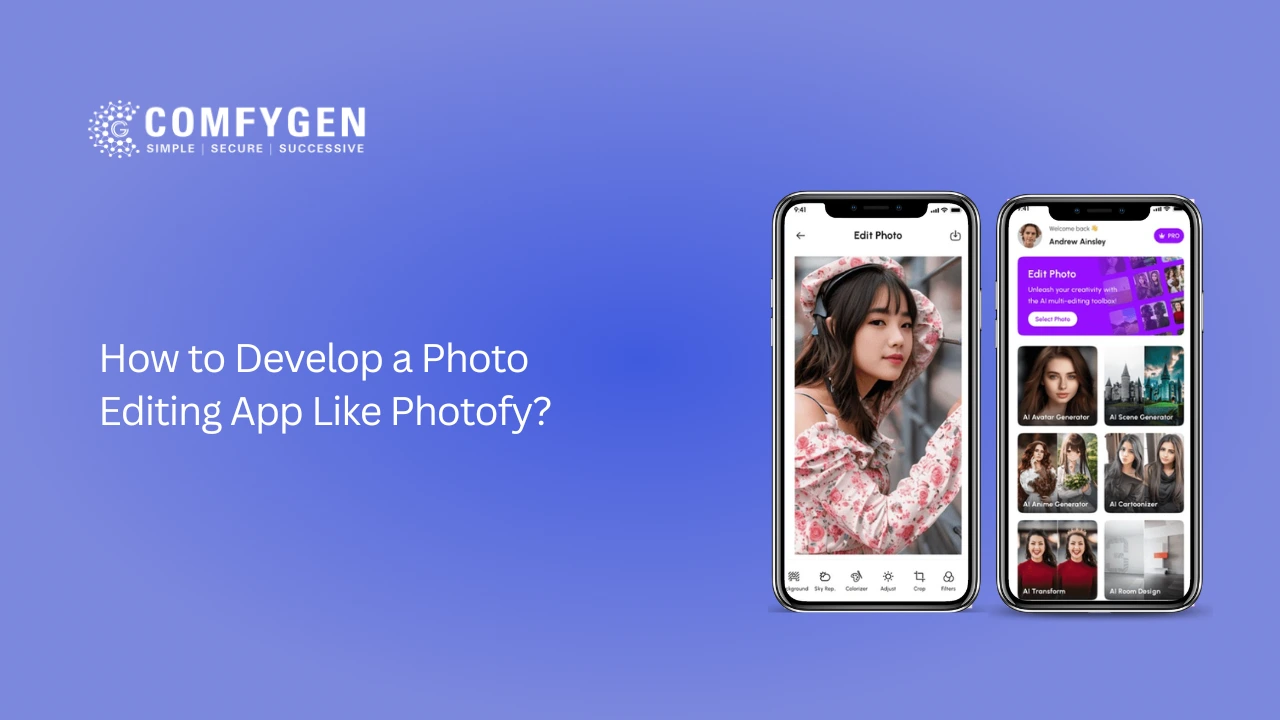
Apps like Photofy built their name on templates, filters, and brand-kit tools for marketers and small businesses. But generative AI now removes objects, regenerates backgrounds, and creates entire scenes from a text prompt — capabilities that didn’t exist in mainstream editing apps two years ago. If you’re planning to develop a photo editing app like Photofy today, AI isn’t an add-on. It’s the baseline users expect.
This guide covers the market opportunity, how Photofy-style apps work, the features that matter, the AI tech stack behind them, a realistic development process, monetization models, and real costs.
Why the Photo Editing App Market Is Still Worth Entering in 2026
The photo editing software market is valued at roughly USD 1.18–2.5 billion in 2026, with steady growth projected through the early 2030s. The bigger story is the AI layer: the global AI image editor market was valued near USD 2.1 billion in 2024 and is projected to reach close to USD 8.9 billion by 2034, a roughly 15.7% CAGR — one of the fastest-growing software categories in the last two years.
A few numbers worth knowing: mobile photo and video app downloads keep climbing year over year; over 700 million people actively use mobile photo editing apps; AI-powered editing now ships in nearly half of new image editing software releases; and Asia-Pacific, with India among its highest-usage markets, is the fastest-growing region for these apps.
The takeaway: demand isn’t slowing, but expectations have shifted. A 2026 app with only filters and stickers will struggle against editors that regenerate backgrounds or remove objects in one tap. If you want to develop a photo editing app like Photofy and actually compete, AI needs to be part of the core product, not a future update.
How Photofy-Style Apps Actually Work
Despite branding differences, most apps in this category follow a similar flow: the user uploads or captures a photo, chooses a starting point (template, frame, filter, or blank canvas), edits color, light, and layout with growing AI assistance, applies AI-assisted refinement like object removal or background replacement, then exports and shares often with platform-specific sizing built in.
What separates a basic editor from a modern one is the refinement step. That’s where machine learning does work that used to require manual masking and layers in desktop software.
Core Features Every Photo Editing App Needs
These are the non-negotiables for any app entering this space:
|
Feature |
What It Does |
|
Filters & Effects |
One-tap visual presets for consistent styling |
|
Text Overlay |
Custom fonts, sizes, and colors for captions or branding |
|
Collage Maker |
Combine multiple images into flexible, templated layouts |
|
Stickers & Emojis |
Decorative and seasonal packs for casual, social-first edits |
|
Background Eraser |
AI-assisted removal for transparent or swapped backgrounds |
|
Beauty Tools |
Skin smoothing and natural face retouching |
|
Crop & Resize |
Platform-specific aspect ratios for Instagram, Facebook, ads |
|
Advanced Color Tools |
Curves, selective color, and exposure controls |
|
Templates & Presets |
Ready-made design kits for brands and creators |
|
Undo/Redo & Version History |
Non-destructive editing for free experimentation |
|
Frames & Borders |
Finishing touches for a polished final image |
Launch Your Own Photofy-Like App
From UI design to backend architecture, get everything you need to launch your photo editing platform.
Request Development Plan
AI Features That Set Modern Apps Apart
If your goal is to develop an AI based photo editing app rather than a basic filter tool, prioritize these in your roadmap:
- Generative Object Removal & Inpainting: diffusion-based inpainting detects and removes unwanted objects while regenerating a believable background, instead of manual pixel cloning.
- AI Background Generation: generative models create a new, context-aware scene from a text prompt or reference style, rather than swapping in a stock image.
- Smart Auto-Enhancement: ML models analyze lighting, exposure, and composition to suggest or apply one-tap corrections.
- Face-Aware Retouching: facial landmark detection enables natural, targeted retouching without distorting proportions — a common complaint with older beauty filters.
- AI Upscaling: super-resolution models recover detail in low-resolution or poorly lit images.
- Style Transfer & Text-to-Image Edits: users describe an edit in plain language and the AI executes it, a workflow now expected in mainstream apps.
- Batch Processing with AI: apply consistent AI-driven edits across dozens of images at once, valuable for creators and small e-commerce sellers.
Building these well usually means integrating established diffusion-based image models rather than training everything from scratch. Architectures like Stable Diffusion have become a common backbone for inpainting and background generation in production apps, typically accessed through hosted APIs rather than self-hosted infrastructure from day one.
Tech Stack to Develop an AI Photo Editing App
A reliable stack for AI photo editing app development typically spans:
- AI & ML: TensorFlow/PyTorch for training and inference, OpenCV for real-time image processing, diffusion model APIs (Stable Diffusion–based) for inpainting and background generation, computer vision models for object/face detection.
- Mobile: Swift for native iOS apps, Kotlin for native Android apps, or React Native/Flutter for cross-platform builds.
- Backend & infrastructure: Node.js or Python (Django/FastAPI) for business logic, GPU-backed cloud compute (AWS, GCP) for AI inference, cloud storage (S3, Firebase), RESTful APIs, and PostgreSQL for managing user data and presets.
- Supporting tools: FFmpeg for video/image compression, ImageMagick for batch transformations, and in-app purchase SDKs for monetization.
Most teams don’t need to train foundation models from scratch. Hosted image-generation and inpainting APIs let you integrate generative features quickly, then optimize cost and speed as usage scales keeping initial AI development timelines realistic instead of turning the MVP into a research project.
How to Build an App Like Photofy: Step-by-Step Process
- Market Research & Positioning: define who the app serves and where competitors fall short.
- Feature Scoping: separate must-have features (filters, cropping, sharing) from AI differentiators (background generation, object removal).
- Tech Stack Selection: choose frameworks based on target platforms and AI needs.
- UI/UX Design: prototype the editing canvas and export flow first, since these are the screens users touch most.
- Core Development: build the editing engine using libraries like OpenCV for real-time processing.
- AI Integration: connect generative and computer vision capabilities through model APIs or custom-trained models.
- Testing & Optimization: test across devices and image sizes, with particular attention to AI processing latency.
- Launch & Iterate: ship an MVP with strong core features and one or two standout AI capabilities, then expand based on real usage data.
Photofy vs. The New Generation of AI Editors
Understanding where Photofy sits relative to where the market has moved shapes how you should differentiate a new app:
|
Category |
Photofy-style apps |
Modern AI-first editors |
|
Primary use case |
Branded templates, social marketing kits |
General editing, generative transformation |
|
Editing method |
Manual selection of templates, filters, text |
Manual tools + prompt-based AI edits |
|
Background handling |
Swap with stock images |
AI-generated, context-aware backgrounds |
|
Object removal |
Limited or manual |
Automated, AI-powered inpainting |
|
Target user |
Small businesses, marketers |
Broader consumer and creator base |
This isn’t a reason to copy Photofy’s feature set or chase a prompt-based editor head-on — it’s a map of the gap. A strong entry point often combines Photofy’s brand-kit strengths with the AI-assisted tools users now expect from any modern photo app.
Monetization: How Photo Editing Apps Make Money
A well-built app still needs a viable revenue model:
- In-App Purchases: sell individual premium filters, AI features, or template packs for occasional users who don’t want a subscription.
- Subscription Model: monthly or annual access to AI features and premium templates; increasingly the dominant model since generative features carry real compute costs.
- Freemium with Ads: free access with ads, paid tier to remove them, effective for scaling users before optimizing paid conversion.
- Branded Content & Partnerships: license templates or filter packs to brands, similar to Photofy’s original positioning.
- API/White-Label Licensing: license your AI editing engine to other apps as a secondary revenue stream once it matures.
Cost to Develop an AI Photo Editing Software
Costs vary significantly by scope, but here’s a realistic range:
|
App Type |
Estimated Cost |
|
Basic editor (filters, crop, text, sharing) |
$5,000 – $15,000 |
|
Mid-tier app with beauty tools and templates |
$15,000 – $30,000 |
|
AI-powered app (background generation, object removal, smart enhance) |
$30,000 – $70,000+ |
Key cost drivers:
- App complexity and number of features
- Platform choice (iOS, Android, or both)
- Depth of AI integration (API-based vs. custom-trained models)
- UI/UX design complexity
- GPU/cloud infrastructure for AI inference
- Development team location and expertise
- Post-launch maintenance and model updates
AI features are usually the biggest swing factor. Established model APIs keep costs predictable; training and hosting custom models adds both development time and ongoing infrastructure costs.
Want a Custom Photo Editing App?
We help startups and businesses build high-performance apps with filters, stickers, and AI-powered tools.
Talk to Our Experts
Common Mistakes to Avoid
- Treating AI as a checkbox feature: A single AI filter without real-world testing leads to inconsistent results that damage user trust.
- Ignoring processing speed: Users tolerate a few seconds for generative edits, not thirty — test latency early.
- Overbuilding the MVP: Ten half-tested AI features perform worse than two that work reliably.
- Underestimating infrastructure costs: GPU inference at scale isn’t free — budget for it before committing to a pricing model.
- Skipping platform-specific export requirements: Aspect ratios and compression standards differ across Instagram and TikTok; getting this wrong creates friction exactly when users want to share.
How Comfygen Helps You Build a Photo Editing App Like Photofy
Comfygen is a mobile app development company with hands-on experience across AI-powered products, from generative AI development to industry-specific applications. For teams looking to develop an AI photo editing app, that means native and cross-platform development for iOS and Android, integration of generative AI and computer vision models, UI/UX design built around real editing workflows, scalable cloud infrastructure for AI inference, and post-launch support as models and platform requirements evolve.
If you’re at the concept stage or already have a feature list in mind, our team can help scope a realistic MVP and roadmap.
Conclusion
The increasingly popular trend of developing such applications is one of the possible inductive rationales in this endeavor for developing an app like Photofy. The growth in social media has always been a counterpart for users to search for easy-to-use tools that help them modify images while expressing their creativity.
Through insight regarding the trends of the market and user preferences, an entrepreneur can now conceptualize creating innovative apps with basic and advanced features, all the way from simple filters to artificial intelligence enhancements. The right selection of suitable technical stacks and a formal process for development are sufficiently useful in guaranteeing product quality.
Besides, taking steps to launch various monetization strategies, for example-in-app purchases and subscriptions models-greatly contribute to a boost in revenue.
Getting the help of an expert photo editing app development service like Comfygen can make this whole process essentially simpler, helping your app get noticed amid stiff competition.
By planning and executing these ideas, you will not just satisfy users’ expectations but also lead to the further windfall of successful business scenarios for your photo editing app.
FAQ
What is the average photo editing app development cost?
Most photo editing app development projects fall between $5,000 and $70,000+, depending on feature depth. A basic editor with filters, cropping, and sharing sits at the lower end ($5,000–$15,000), while an AI-powered app with background generation, object removal, and smart enhancement pushes costs to $30,000–$70,000 or more. Platform choice (iOS, Android, or both), the depth of AI integration, and ongoing GPU/cloud infrastructure for inference are the biggest factors that move the final number.
How long does it take to build an app like Photofy?
A basic MVP typically takes 3–4 months. Adding AI features like background generation or object removal usually extends this to 5–8 months.
Do I need to train my own AI models?
Not necessarily. Most teams start with hosted AI APIs, which is faster and more cost-effective than training from scratch. Custom models become worthwhile once you have usage data and a clear differentiation need.
What's the difference between a photo editing app and an AI photo editing app?
A traditional app relies on manual tools — filters, cropping, manual background swaps. An AI photo editing app automates parts of that process: detecting objects, regenerating backgrounds, and suggesting enhancements without manual masking.
Can I add AI features to an existing photo editing app instead of building new?
Yes. Many businesses integrate AI capabilities as a feature update rather than rebuilding from scratch, which is often more cost-effective.
What platforms should I launch on first?
Most apps see stronger early adoption on iOS in North America and Europe, and on Android in Asia-Pacific markets, including India. Your launch platform should follow your target audience's dominant device ecosystem.

Mr. Saddam Husen, (CTO)
Mr. Saddam Husen, CTO at Comfygen, is a renowned Blockchain expert and IT consultant with extensive experience in blockchain development, crypto wallets, DeFi, ICOs, and smart contracts. Passionate about digital transformation, he helps businesses harness blockchain technology’s potential, driving innovation and enhancing IT infrastructure for global success.