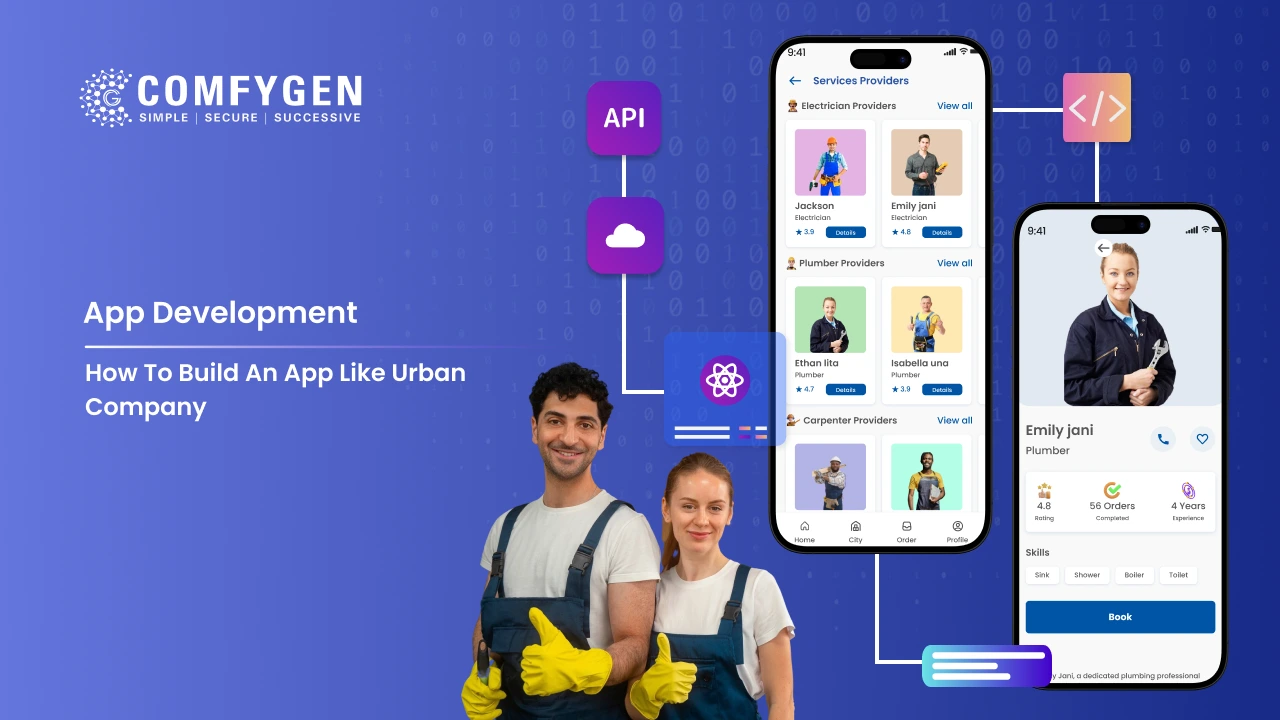





Imagine booking a professional plumber, a certified beautician, or an expert electrician in under 60 seconds — background-verified, standardized pricing, GPS-tracked, money-back guaranteed. That is not a fantasy. That is what Urban Company built, and that is exactly why investors valued it at over $2.8 billion as of 2024, making it one of South Asia’s most successful on-demand home service platforms.
The model works — and in 2026, it is more replicable than ever. Advances in AI-powered matching, cross-platform mobile frameworks, and hyperlocal infrastructure mean that a well-funded startup or an established enterprise can launch a credible Urban Company alternative in a matter of months.
This guide from comfygen— a mobile app and software development company with 8+ years of experience building on-demand marketplaces — walks you through everything: the business model, the must-have features, the tech stack, the development roadmap, realistic cost estimates, and the monetization strategies that actually work in 2026.
Understanding the Urban Company Business Model
Before writing a single line of code, you must understand why Urban Company works — because the model, not the app, is the product.
Two-Sided Marketplace Mechanics
Urban Company operates as a two-sided marketplace connecting service professionals (supply side) with urban households (demand side). Unlike a job board or a directory, Urban Company controls the end-to-end experience — pricing, quality standards, payment, and dispute resolution. This vertical integration is its primary moat.
Revenue Streams
The platform monetizes through multiple channels:
- Commission per booking: 15–25% of each transaction, the core revenue engine
- Professional subscription plans: Providers pay monthly fees for premium lead access and kit financing
- Product sales: Branded cleaning kits, beauty products, and tools sold to both pros and customers
- B2B / enterprise contracts: Corporate office cleaning, housing society tie-ups, hotel chains
- Insurance and financing: Income protection insurance for professionals, equipment loans
According to their data, the company operates across 60+ cities and 55,000 Service Partners — a testament to the scalability of the model when execution is right.
What Makes It Defensible
- Background-verified, trained professionals create a safety moat that casual aggregators cannot match
- Standardized pricing eliminates negotiation anxiety — the #1 friction in home services
- Quality guarantee with re-service or refund builds customer trust loops
- Data network effects: more bookings generate better matching data, improving outcomes for both sides
Market Opportunity in 2026: Why Now?
The global smart home services market size was valued at USD 5.6 billion in 2021 and is projected to reach USD 11.7 billion by 2028, growing at a CAGR of 11.2% from 2022 to 2028. The increasing adoption of cognitive systems in smart homes is increasing demand for installation and maintenance services, thereby driving the expansion in the industry.
- Post-pandemic normalization: Consumers now default to app-based home services the way they default to Swiggy for food
- Gig economy maturity: Millions of skilled workers are actively seeking platform-based income
- AI and automation: Smarter dispatch, dynamic pricing, and predictive demand reduce CAC and improve margins
- Tier-2 and Tier-3 city penetration: Urban Company and its peers have barely scratched mid-sized cities — a huge greenfield opportunity
- Service category expansion: Pet care, elder care, mental wellness — new verticals emerging alongside traditional home services
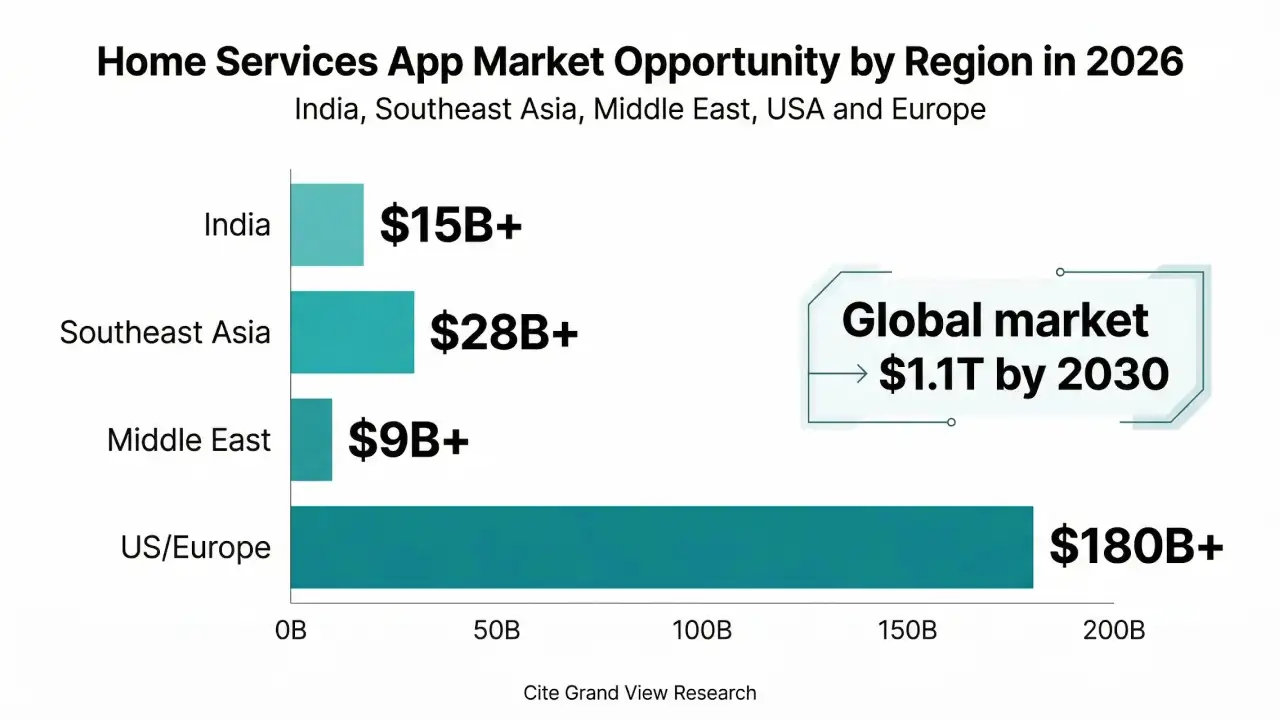
| Region | Market Size (2025) | Key Opportunity |
| India | $15B+ | Tier-2 city penetration, vernacular UX |
| Southeast Asia | $28B+ | Indonesia, Vietnam, Philippines expansion |
| Middle East | $9B+ | UAE, KSA premium home services |
| US / Europe | $180B+ | Trust-layer and gig classification reform |
Core Features of an Urban Company-Like App
Building for this market means building three distinct products simultaneously: a customer app, a professional app, and an admin panel. Each has a different user mental model.
Customer App (User-Facing)
- Smart service discovery: Category browsing, AI-powered recommendations based on history and location
- Real-time booking engine: Date/time slot selection with live availability from verified providers
- In-app chat and call masking: Communication without exposing phone numbers
- Live GPS tracking: Real-time professional arrival tracking with ETA updates
- Multi-modal payment: UPI, cards, wallets, BNPL, corporate billing
- Transparent pricing: Itemized quotes before confirmation — no surprise charges
- Review and rating system: Dual-sided reviews with photo upload support
- Service history and rebooking: One-tap rebooking from past service records
Professional / Provider App
- Smart job alerts: Push notifications filtered by skill set, location radius, and availability
- Earnings dashboard: Daily, weekly, and monthly earnings with payout breakdown
- Digital calendar management: Accept/decline jobs, manage blocked dates
- KYC document upload: Aadhaar, PAN, police verification, skill certificates
- In-app training modules: Video-based skill certifications and SOPs
- SOS and safety tools: Emergency contact triggers, session check-ins for professional safety
Admin Panel
- KYC verification pipeline: Document review queue with approve/reject workflow and video KYC integration
- Dynamic pricing engine: Surge pricing, promotional pricing, category-level pricing controls
- Booking management: Real-time booking feed, manual reassignment, cancellation handling
- Dispute resolution centre: Ticket system with SLA timers, photo evidence upload
- Analytics dashboard: GMV, CAC, LTV, NPS, city-level performance heatmaps
- Provider performance scoring: Composite score from ratings, punctuality, and completion rate
2026-Specific Advanced Features
These are no longer nice-to-haves — they are competitive requirements in 2026:
- AI-based provider matching: Matching algorithm using historical performance, proximity, skill match, and customer preference data
- AR-assisted estimates: Customers point their phone camera at a room or object to get instant service quotes
- Predictive demand scheduling: ML model that pre-positions professionals in high-demand zones
- Multi-language support: Regional language UX for Tier-2 city penetration
- Voice booking: Conversational AI booking for low-literacy user segments
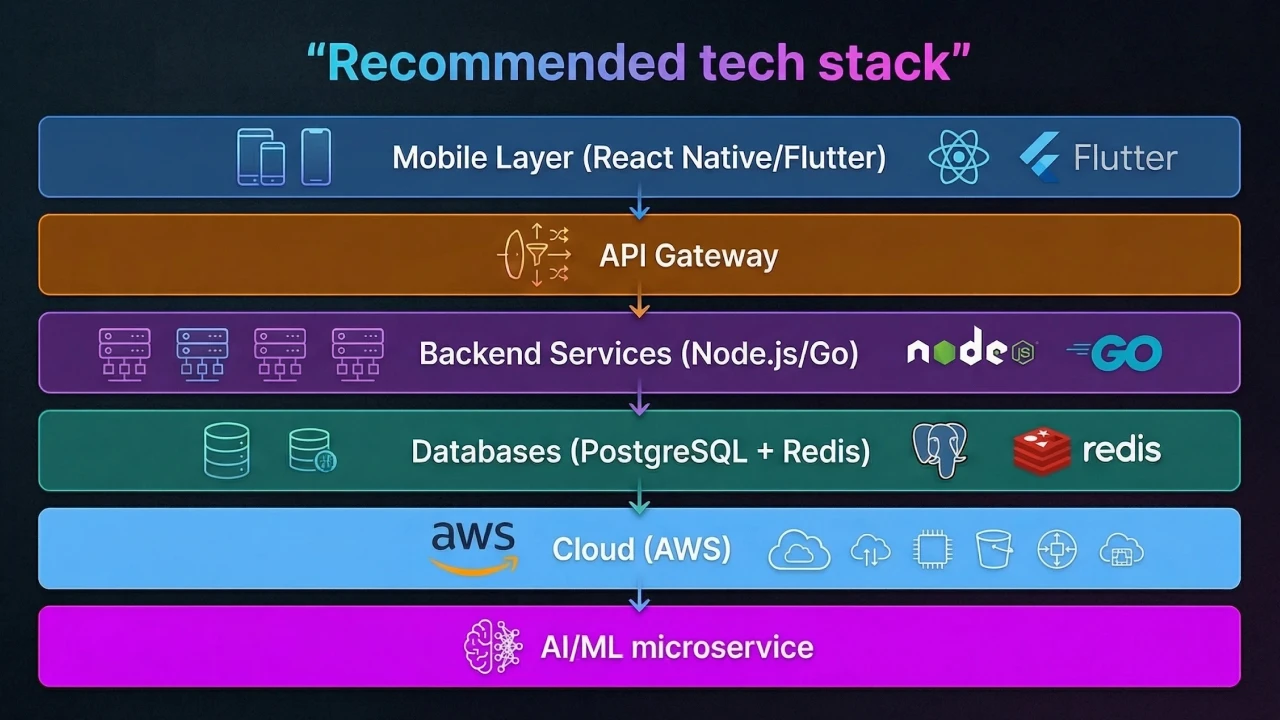
Recommended Tech Stack to Develop an App like Urban Company
Your technology choices at the MVP stage will determine how quickly you can scale — and how expensive it will be to refactor when you do. Here is what we recommend at Comfygen based on building similar platforms:
|
Layer |
Recommended Technology |
Why |
| Mobile (iOS & Android) | React Native or Flutter | Single codebase, 80% faster time-to-market vs native |
| Backend API | Node.js (Express) or Go | High concurrency for booking/real-time events; Go for performance at scale |
| Database (primary) | PostgreSQL | ACID compliance is critical for booking transactions and payment records |
| Cache & sessions | Redis | Sub-millisecond session reads; real-time availability state |
| Real-time (chat/tracking) | Socket.io or Firebase Realtime DB | Low-latency bidirectional events for GPS and chat |
| Cloud infrastructure | AWS (ECS + RDS + S3) | Most mature ecosystem for marketplace infrastructure; GCP is also viable |
| Payments | Razorpay (India) / Stripe (global) | Split payments, escrow, and payout management are built in |
| Maps & geolocation | Google Maps Platform | Best-in-class routing, distance matrix, and geocoding accuracy |
| AI/ML | Python (FastAPI) microservice | Isolated ML inference for the matching algorithm and demand forecasting |
| Video KYC | Aadhaar eKYC / Digio / Hyperverge | Regulatory-compliant identity verification for the Indian market |
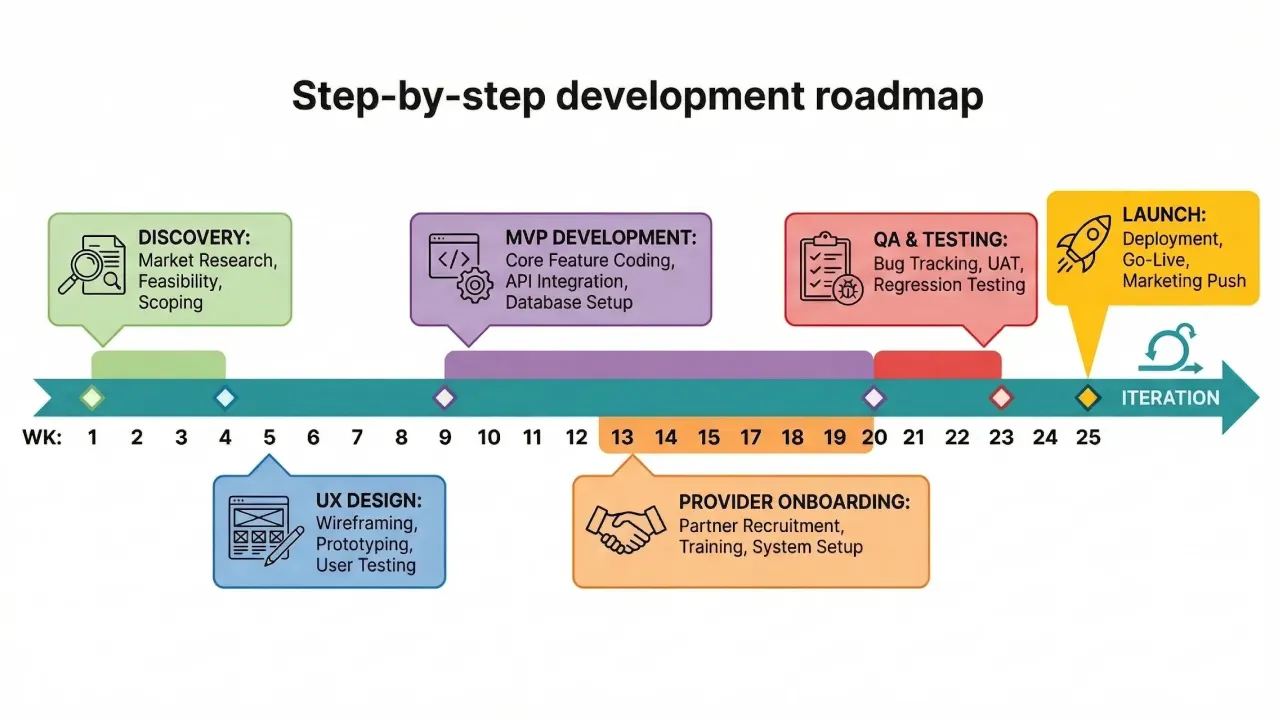
Step-by-Step Roadmap to Build an App Like Urban Company
Building a two-sided marketplace is not the same as regular mobile app Development. It requires a disciplined sequence — most failed clones collapse because they tried to build everything at once.
Step 1: Discovery and Validation (Weeks 1–4)
Do not start with wireframes. Start with evidence. Conduct 20–30 customer interviews in your target city and 15–20 provider interviews. Identify the single most painful booking experience. Map your competitor’s weaknesses — not their features. Validate your unit economics model before a single UI is designed.
Step 2: Wireframing and UX Design (Weeks 5–8)
Build high-fidelity Figma prototypes of the three apps (customer, provider, admin). Focus on the booking flow — it must complete in under 4 taps for the customer. Run usability tests with 10 real users before handing off to development.
Step 3: MVP Development (Weeks 9–20)
Scope your MVP ruthlessly. The MVP must include: customer booking flow, provider job management, basic admin panel, payment integration, and rating system. Nothing else. A 12-week sprint with a team of 6–8 engineers is realistic for this scope.
See our detailed on-demand Home app development services page for guidance on team composition.
Step 4: Provider Onboarding System (Weeks 14–20, parallel)
The supply side is the hardest problem in a two-sided marketplace. Build your KYC pipeline, background check integration, and training module in parallel with customer app development. You need 50–100 verified providers per city before you can launch.
Step 5: QA and Beta Testing (Weeks 21–24)
Run a closed beta in one city with 200–500 invite-only customers and 30–50 verified providers. Measure booking completion rate, provider acceptance rate, customer satisfaction score, and average time-to-confirmation. All four must hit minimum thresholds before a public launch.
Step 6: Launch and Growth Loop (Week 25 onwards)
Launch with a hyperlocal marketing blitz in one or two neighbourhoods — not city-wide. Density matters more than reach in the early phase. Your growth loop should be: first booking discount → quality service → referral → rebooking. CAC must be subsidized by LTV math, not hope.
Step 7: Post-Launch Iteration
Instrument everything with Mixpanel or Amplitude. Set up a weekly product review cycle. Use feature flags for controlled rollouts. Build a user feedback channel directly in the app. The best Urban Company competitors failed not at launch but in the 6-month post-launch iteration phase — they stopped listening.
How Much Does It Cost to Build an App Like Urban Company?
This is the most searched question about this topic — and the most evasive answer. We are going to give you actual numbers.
| Development Area | Freelancer (USD) | Mid-Tier Agency (USD) | Comfygen-Level (USD) |
| Discovery & UX design | $2,000–5,000 | $8,000–15,000 | $10,000–18,000 |
| Customer app (iOS + Android) | $5,000–12,000 | $18,000–35,000 | $22,000–40,000 |
| Provider app (iOS + Android) | $4,000–10,000 | $15,000–28,000 | $18,000–32,000 |
| Backend API development | $5,000–12,000 | $20,000–40,000 | $25,000–45,000 |
| Admin panel | $2,000–5,000 | $8,000–15,000 | $10,000–18,000 |
| AI matching algorithm (basic) | Not available | $8,000–15,000 | $12,000–20,000 |
| QA and testing | $1,500–3,000 | $6,000–12,000 | $8,000–15,000 |
| Deployment & DevOps setup | $1,000–2,000 | $4,000–8,000 | $5,000–10,000 |
| TOTAL (MVP estimate) | $20,500–49,000 | $87,000–168,000 | $110,000–198,000 |
Ongoing monthly costs post-launch: Cloud infrastructure ($500–3,000/month), third-party APIs ($300–1,500/month), support and maintenance ($2,000–8,000/month), and marketing budget (variable). For a detailed estimate specific to your requirements, contact our team at Comfygen.
Build vs Buy: White-Label vs Custom
White-label clone scripts cost from $999 to $9,999. They can get you to an MVP demonstration faster. However, they come with significant hidden costs: rigid architecture that cannot accommodate your differentiation, poor code quality that becomes a technical debt trap, missing compliance features for your target market, and near-zero AI/ML extensibility. For a serious market entry, custom mobile app development is the only defensible path.
Monetization Strategies To Build An App Like Urban Company in 2026
The commission-only model works at scale but is brutal in the early stage when GMV is low. Here is how to build a diversified revenue architecture:
Commission Model
Standard in the sector: 15–25% take rate per booking. Start at 15% to attract providers, then optimize upward as the platform becomes indispensable to their income. Tiered commission based on rating and experience incentivizes quality.
Provider Subscription Plans
A monthly subscription (Rs. 299–999/month equivalent tier) for premium placement, guaranteed minimum jobs, and access to kit financing. This creates predictable recurring revenue independent of transaction volume — critical for investor metrics.
In-App Product Sales
Sell branded cleaning products, beauty consumables, tools, and uniforms to both providers and customers. Gross margin on products is typically 40–60%, significantly higher than service commission. Urban Company’s product business is reportedly one of its highest-margin segments.
B2B Enterprise Contracts
Housing societies, corporate campuses, hotel chains — they need weekly recurring services at negotiated bulk rates. B2B contracts have 12–24 month lock-ins and predictable LTV. Build a simple enterprise portal from Day 1, even if you do not market it until Month 6.
Insurance and Financial Products
Income protection insurance for gig workers is a massively underserved market. Platform-facilitated insurance products generate referral revenue and dramatically increase provider stickiness. Explore partnerships with insurance aggregators and NBFC-backed financing products for equipment purchase.
Challenges and How to Overcome Them
Most Urban Company clones fail. Not because of the idea, but because of execution blind spots. Here are the most common — and how to navigate them.
Supply-Side Quality Control
The problem: One bad service experience can permanently alienate a customer in a trust-dependent category like home services.
The solution: Build a composite professional score (rating + punctuality + completion rate + cancellation rate) and de-list providers who drop below a threshold. Invest in onboarding training before the first job — not after complaints.
The Cold Start Problem
The problem: Without providers, customers do not book. Without bookings, providers do not register. This chicken-and-egg is the graveyard of most two-sided startups.
The solution: Launch in one neighbourhood, not one city. Sign up 50 providers manually before the app goes live. Subsidize the first 100 bookings to generate reviews. Density beats geography every time in the early stage.
Unit Economics Pressure
The problem: Deep discounting to acquire customers destroys contribution margin and trains users to wait for offers.
The solution: Discount on the first booking only. Win on quality and reliability for repeat bookings. Track contribution margin per city, not just GMV — a city with high GMV and negative CM is a liability.
Regulatory Complexity in 2026
Gig worker classification laws are evolving rapidly. The EU’s Platform Work Directive 2024 introduced a rebuttable presumption of employment for platform workers. Similar frameworks are being discussed in India and Southeast Asia. Build your compliance architecture — worker classification documentation, payment audit trails, insurance records — from Day 1.
Retention After the First Booking
Industry data shows that on-demand platforms lose 60–70% of first-time users before the second booking. Build a deliberate re-engagement loop: a post-service satisfaction check (24 hours), a personalized rebooking reminder (30 days), and a loyalty program (5th booking free or discounted). Retention is 5x cheaper than acquisition.
Why Choose Comfygen to Build Your On-Demand App?
At Comfygen, we have designed and developed on-demand home service platforms for clients across India, the UAE, the US, and Southeast Asia. Our team of 120+ engineers, designers, and product managers brings a proven playbook to every engagement:
- End-to-end delivery: From discovery and UX through development, QA, deployment, and growth — under one roof
- Domain expertise: We have built two-sided marketplaces across home services, beauty, logistics, and healthcare
- Transparent pricing: Fixed-price MVP contracts with milestone-based payment — no scope creep surprises
- Post-launch support: Dedicated maintenance and feature development teams for scaling clients
- IP ownership: You own 100% of your code, data, and infrastructure — always
Explore our portfolio of delivered applications at comfygen.com/portfolio, or read about our mobile app development process.
Conclusion
Urban Company’s success is not magic. It is the result of disciplined two-sided marketplace mechanics, relentless quality control, and a technology platform that scaled with the business. Every element of that success is replicable in 2026 — in new geographies, new service categories, and with new technologies that were not available when Urban Company started.
The window is open. Tier-2 cities in India, the home services markets across Southeast Asia and the Middle East, and vertical-specific categories like elder care and pet services are waiting for a platform that takes quality and trust as seriously as Urban Company did.
If you are ready to move from idea to execution, Comfygen’s home service app development team is ready to help. We offer free discovery consultations, fixed-price MVP contracts, and post-launch growth support. Schedule a call with our team today — and let us build the platform your market is waiting for.
FAQ
How long does it take to build an app like Urban Company?
What is the cost of building an on-demand home services app in 2026?
Can I build an Urban Company clone without coding?
What is Urban Company's business model?
How do I onboard service professionals to my platform?
How do I ensure customer safety on the platform?

Mr. Saddam Husen, (CTO)
Mr. Saddam Husen, CTO at Comfygen, is a renowned Blockchain expert and IT consultant with extensive experience in blockchain development, crypto wallets, DeFi, ICOs, and smart contracts. Passionate about digital transformation, he helps businesses harness blockchain technology’s potential, driving innovation and enhancing IT infrastructure for global success.