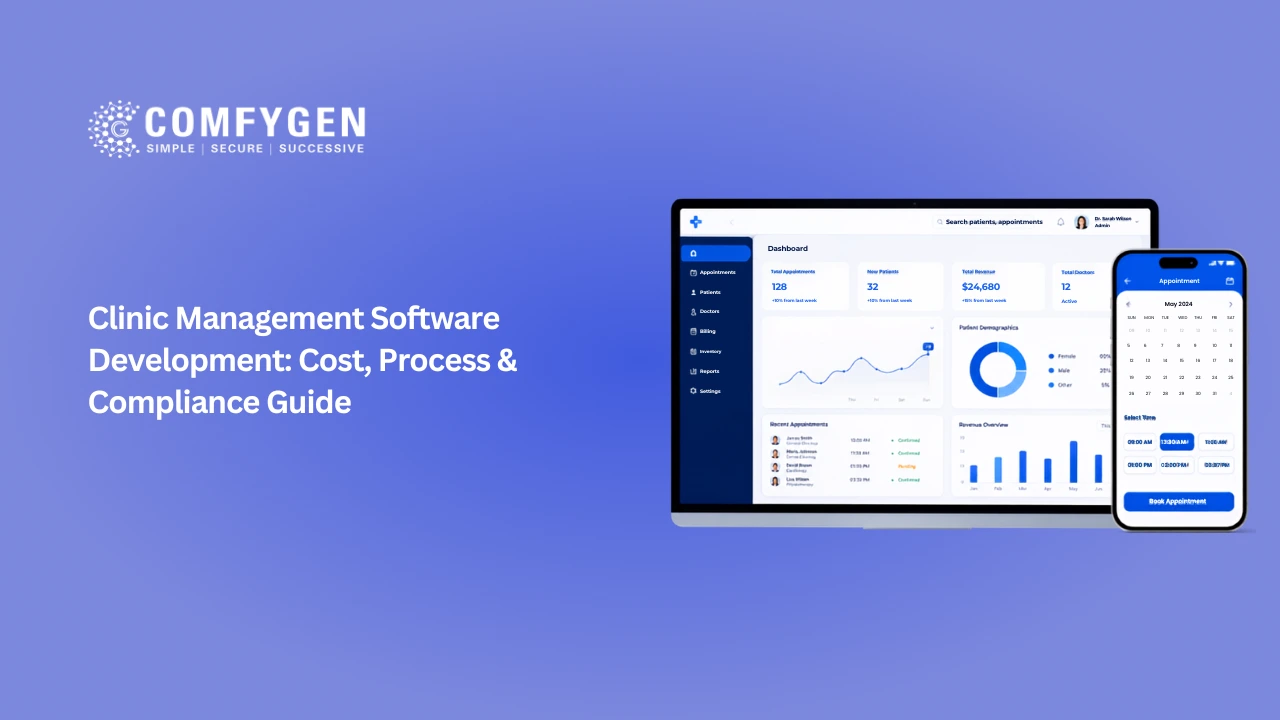





Clinic management software is a single system that runs a clinic’s patient registration, appointment scheduling, electronic health records, billing and inventory. Custom clinic management software development costs $15,000 to $200,000 depending on branch count, integrations and compliance scope, and takes 4 to 14 months. Most clinics under three locations are better served buying an existing platform. Building your own pays off when you run multiple branches, have specialty workflows, standard tools handle badly, or intend to license the platform to other clinics.
What clinic management software is, and how it differs from hospital management software
Plenty of guides treat the two terms as interchangeable. They shouldn’t.
Clinic management software handles outpatient flow. A patient arrives, registers, sees a doctor, gets a prescription, pays, leaves. The system covers registration, scheduling, clinical records, billing and whatever inventory the clinic holds. Some vendors market the same thing as patient management software, which is the same product described from the front desk’s point of view.
Hospital management software does all of that and adds inpatient admissions, ward and bed allocation, operation theatre scheduling, discharge summaries and departmental cost centres.
The difference shows up in the data model. Build a clinic management system on a hospital schema and you inherit admission and bed tables nobody will ever open. Build a hospital on a clinic schema and you’ll be rewriting it inside a year.
Simple test: if your facility has beds, you need a hospital system. If it doesn’t, this guide is the right one.
Clinic management software features: the modules that matter
| Module | What it covers | Share of build | Can you cut it? |
| Patient registration | Demographics, ID verification, consent capture, document storage | 10–14% | No |
| Appointment scheduling | Multi-doctor, multi-branch, conflict resolution, waitlists | 12–18% | No |
| Electronic health records | Clinical notes, prescriptions, lab results, imaging links | 18–25% | No |
| Billing and payments | Invoicing, insurance claims, reconciliation, outstanding dues | 15–22% | No |
| Pharmacy and inventory | Dispensing, expiry tracking, reorder alerts, controlled drugs | 8–12% | Yes, if no in-house pharmacy |
| Patient portal | Booking, records access, results, payment history | 8–12% | Yes, phase two |
| Teleconsultation | Video, in-call prescribing, notes written back to the record | 6–10% | Yes, phase two |
| Reporting and analytics | Occupancy, doctor productivity, revenue, retention | 6–10% | Yes, phase two |
| Staff and roster | Shifts, leave, performance, payroll handoff | 4–7% | Yes |
The first four are the system. Everything else is scope you can sequence.
Two modules consistently blow budgets. Scheduling looks trivial until you hit multi-specialty clinic management software, where pre-procedure visits, linked follow-ups and group bookings all collide in one calendar. And the EHR data model is the one thing you cannot retrofit cheaply, because every other module reads from it.
Build, buy, or customise your clinic management system
| Factor | Buy off-the-shelf | Customise an existing platform | Build custom |
| Time to live | 2–8 weeks | 3–5 months | 4–14 months |
| Upfront cost | $0–3,000 setup | $18,000–45,000 | $15,000–200,000 |
| Running cost | $40–300 per user/month | Licence plus support | Hosting plus 15–20% maintenance |
| Workflow fit | Standard only | Moderate | Complete |
| Integration depth | Vendor APIs only | Partial | Full |
| Code ownership | None | Partial | Complete |
| Best for | 1–2 locations, standard outpatient flow | Mid-size with some specialty needs | Chains, unusual specialties, platform plays |
The expensive mistake is predictable. A chain with six or eight branches buys an off-the-shelf tool to move fast, hits a customisation ceiling in month six, then commissions the custom build anyway. They pay both.
Custom clinic management software makes sense in four situations: more than three branches, specialty workflows standard platforms handle badly (fertility, dialysis, oncology day care, physiotherapy), a need to embed clinical records inside your own platform, or an intention to license the software to other clinics.
For clinic management software for small clinics running one or two locations with ordinary outpatient workflows, buying is the honest answer. Any vendor who won’t say so is selling rather than advising.
Clinic management software development cost in 2026
| Tier | Scope | USD | INR |
| MVP, single clinic | Registration, scheduling, basic EHR, billing | $15,000–30,000 | ₹13–26 lakh |
| Standard, single clinic | Adds patient portal, prescriptions, basic reporting, payments | $30,000–60,000 | ₹26–52 lakh |
| Multi-branch | Adds 2–10 branches, pharmacy, teleconsultation, insurance claims, analytics | $70,000–140,000 | ₹60 lakh–1.2 crore |
| Multi-tenant SaaS | Adds tenant isolation, subscription billing, white-label, onboarding flows | $150,000–300,000+ | ₹1.3–2.6 crore+ |
Annual maintenance runs 15% to 20% of build cost and covers compliance updates, payer rule changes, support and security patches.
Cost by development region
| Region | Blended hourly | Standard single-clinic build |
| US and Canada | $90–160 | $85,000–150,000 |
| UK and Western Europe | $75–130 | $70,000–125,000 |
| Eastern Europe | $45–75 | $42,000–72,000 |
| India | $25–45 | $24,000–45,000 |
The rate gap is real, but it only converts into savings when the team has shipped a clinical system before. A team learning EHR data modelling on your budget will spend the difference on rework. Ask any vendor which clinical systems they’ve shipped and which health portals they’ve integrated with. The answer is short and informative.
What pushes the cost up
- Each branch after the first: Not linear, but not free either. Branch-aware scheduling, inventory and reporting add roughly 8% to 12% each for the first few.
- Offline-first operation: Clinics with unreliable internet need local-first data with sync and conflict resolution. Add 15% to 25%.
- Insurance claim handling: Claim submission and remittance reconciliation is close to a project of its own. The economics of that layer are covered in our breakdown of what billing software costs to build.
- Multi-tenancy: Decide before the first migration file. Retrofitting tenant isolation after launch is one of the more painful migrations in healthcare software.
- Regional language support: Especially right-to-left scripts for Gulf deployments.
What brings it down
Launch one branch before rolling out to all of them. Ship manual insurance claims entry first and automates in phase two. Start web-only, since clinic staff work at desks. Skip analytics until there’s data worth analysing.
Ready to Build Your Own Clinic Management Software?
Simplify clinic operations with custom software designed to streamline appointments, manage patient records, automate billing, and improve overall healthcare service delivery.
Get a Free Consultation
Architecture and tech stack for a clinic management system
Monolith or microservices is the first real call, and the right answer is usually the unfashionable one.
A single clinic seeing under 200 outpatients a day with one or two departments should run a modular monolith on a managed cloud. Faster to build, cheaper to operate, entirely sufficient.
Microservices earn their keep for multi-branch chains and white-label platforms, where scheduling, billing and records need to deploy independently. They also add 40% to 60% infrastructure complexity and roughly double DevOps overhead.
Anyone recommending microservices to a ten-doctor single-location clinic is designing for their own CV, not your operation.
Deployment model. Cloud-based clinic management software is the default now, and for good reason: no upfront hardware, automatic backup, and access across branches without a VPN. On-premise still makes sense where data residency rules are strict or connectivity is genuinely unreliable. Hybrid suits clinics that want records on-site and everything else in the cloud, at the cost of managing two environments.
Stack that holds up in production:
- PostgreSQL as the primary store. Clinic data is deeply relational, and you’ll run reports that depend on joins a document store makes painful.
- Node.js for real-time scheduling and notifications, Python for anything doing clinical data processing or forecasting.
- React for the admin interface, React Native if you need doctor and patient apps.
- HL7 FHIR R4 from the start if there’s any chance of exchanging data with labs, hospitals or national health systems. Retrofitting FHIR is a rewrite.
Clinic interfaces get used for eight hours straight by staff who did not choose the software, which makes density and speed of recognition more important than visual polish. The principles are in our guide to healthcare interface design.
Compliance requirements by market
Every guide on this topic assumes one jurisdiction. Here’s what actually applies where.
| Market | Framework | What it changes in the build |
| United States | HIPAA | PHI encryption at rest and in transit, role-based access, immutable audit logs, BAAs with every vendor touching data, six-year documentation retention |
| United Kingdom | UK GDPR, NHS DSP Toolkit | Lawful basis for processing, DSP Toolkit submission if connecting to NHS systems, MHRA if any feature makes a clinical claim |
| European Union | GDPR, EU AI Act | Explicit consent, right to erasure against a medical retention obligation, AI Act duties if you add clinical decision features |
| India | DPDPA 2023, ABDM | Data residency within India, consent management patients can revoke, ABHA ID integration, 4 to 6 weeks of ABDM work |
| UAE | DHA and DOH rules, eClaimLink | Health data stays in-country, claims submitted through eClaimLink in its own XML schema |
Three points that cost real money if missed.
Data residency is not a hosting checkbox: India and the UAE both require health data to stay in-country. That becomes a problem when a vendor picks a US-headquartered cloud without specifying the region.
Consent management is a module, not a tickbox: Under DPDPA and GDPR, patients must be able to view, modify and revoke consent. Template-based systems rarely include this.
Retention conflicts with erasure: Medical records carry minimum retention periods, commonly seven years, which sits awkwardly against a right-to-erasure request. The resolution has to be designed, not improvised during an audit.
Compliance is not a phase. Every architecture decision in month one either creates compliance debt or pays it down.
AI features in clinic management software: what’s worth building in 2026
Worth it now:
- No-show prediction: Clinics typically lose 10% to 20% of slots to no-shows. A model of 12 months of scheduling history pays for itself fast.
- Documentation assistance: Speech-to-text that drafts the consultation note and writes it back to the record. The fastest-spreading AI tool in healthcare right now, because it cuts admin time without touching clinical decisions.
- Drug interaction and allergy checking at the point of prescribing: Mostly rules-based, high clinical value, low regulatory exposure.
- Inventory forecasting: Predicts reorder points from dispensing patterns. Matters most where there’s an attached pharmacy, and the same logic drives pharmacy platforms.
Not yet:
Anything that suggests a diagnosis. The moment software makes a clinical claim, it may meet the Software as a Medical Device definition, and that turns the project from a software build into a regulatory programme. Build the AI features that assist staff, not the ones that replace clinical judgement.
How long clinic management software development takes
| Scope | Team | To production |
| MVP, single clinic | 2–3 engineers | 4–5 months |
| Standard, single clinic | 3–5 engineers | 5–7 months |
| Multi-branch | 5–7 engineers | 8–12 months |
| Multi-tenant SaaS | 7–10 engineers | 12–18 months |
Clinics hear twelve months and try to negotiate to six. That negotiation usually produces a fourteen-month project, because what got cut was testing and compliance review, and both come back.
The reliable schedule killers are integration credentialing with health portals and payers, which runs four to eight weeks of waiting, and underestimating how long realistic test data takes to build.
How to choose a clinic management software development company
Ask these six questions before signing anything. A vendor who answers all six with specifics is worth a second call. One who defers half of them to a follow-up probably hasn’t done this before.
- Have you shipped an EHR before, and can I speak to that client?
- Which health portals and payer systems have you integrated with directly?
- Is compliance review a named step in your process, or is it assumed?
- How do you handle offline operation for low-connectivity branches?
- What does post-launch support include, and what is billable?
- Who owns the code and the cloud accounts after delivery?
Five mistakes that cost the most
- Building the interface first: The reception screen is maybe 20% of the work. Teams that start there find the architecture can’t support claims or reporting and rebuild.
- Treating the EHR schema as a phase-two concern: Every other module reads from it. Get it wrong and the cost compounds monthly.
- Single-tenant when you meant to sell it: Decide before the data model is written.
- No offline plan: If any branch has unreliable internet, that’s an architecture requirement, not a feature request.
- Skipping the staff training budget: Clinic staff cannot afford a productivity dip during cutover, and an untrained rollout gets blamed on the software.
Closing
The clinics that end up with software they actually use spend their first two weeks not writing code. They map workflows, list payers and integrations, and settle the compliance position before anyone opens an editor.
The ones that end up rebuilding start from a feature list and a deadline.
Comfygen has been building healthcare platforms since 2019, across 550+ projects for 400+ clients in 30+ countries, with ISO 9001:2015, ISO/IEC 20000-1:2018 and ISO 27001 certification. The team scopes compliance and integrations before architecture, because both reshape everything downstream. If you’re weighing a clinic management system against an off-the-shelf platform, or want it built alongside wider healthcare systems such as doctor appointment booking or teleconsultation, a scoping session will give you a range you can budget against.
Frequently Asked Questions
What is clinic management software?
How much does clinic management software development cost?
How long does it take to build a clinic management system?
Should I build or buy clinic management software?
What features should clinic management software have?
What is the difference between clinic management and hospital management software?
Which database is best for clinic management software?
Does clinic management software need to be HIPAA compliant?
Can clinic management software be built as a SaaS product?
What integrations does a clinic management system need?

Mr. Saddam Husen, (CTO)
Mr. Saddam Husen, CTO at Comfygen, is a renowned Blockchain expert and IT consultant with extensive experience in blockchain development, crypto wallets, DeFi, ICOs, and smart contracts. Passionate about digital transformation, he helps businesses harness blockchain technology’s potential, driving innovation and enhancing IT infrastructure for global success.